

Integre a localização empresarial sem sobrecarga na base de dados.
Os plugins de tradução tradicionais do WordPress abrandam frequentemente os sites ao duplicar cada publicação e página na sua base de dados. O MultiLipi adota uma abordagem diferente. O nosso plugin dedicado para WordPress funciona como um componente leve Conetor da API, ligando o seu site à nossa Neural Translation Cloud. Isto garante que o seu site se mantém rápido, fornecendo conteúdo otimizado para SEO em mais de 120 idiomas.
Este guia detalha o processo de instalação e autenticação utilizando o oficial MultiLipi Translate plugin.
1. Pré-requisitos de Implementação
Antes de iniciar a instalação, certifique-se de que tem:
Acesso de Administrador
Deve ter permissões para instalar e ativar plugins (função de administrador).
Chave API MultiLipi
Localize isto no seu Painel de Controlo em Definições > Geral.
2. Passo 1: Instalar o Módulo Conector
O plugin está alojado no repositório oficial do WordPress para segurança e facilidade de atualizações.
- 1
Inicie sessão na sua Painel de Administração do WordPress.
- 2
Navegue até Plugins > Adicionar Novo na barra lateral esquerda.
- 3
Pesquisar: Escreva "MultiLipi Translate" na barra de pesquisa.
- 4
Instalar: Clique Instalar Agora no plugin oficial MultiLipi.
- 5
Ativar: Clique Ativar para inicializar o módulo.
Ação do Sistema
Um novo item de menu com a etiqueta MultiLipi aparecerá sob o seu principal Definições separador.
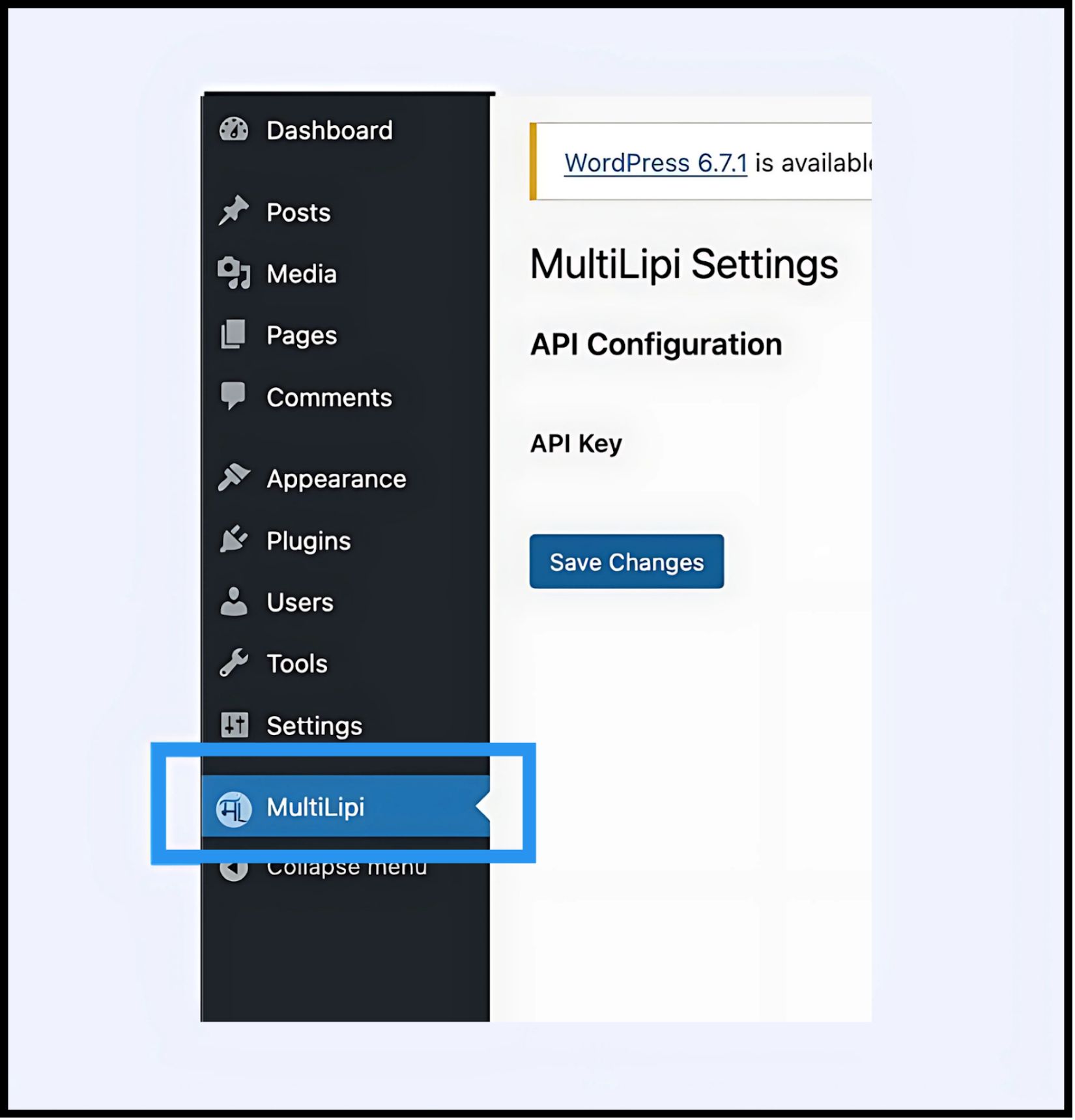
3. Passo 2: Estabelecer a Ligação API
Tem de autenticar o plugin para ligar o seu site ao seu projeto MultiLipi.
- 1
Navegue até Definições > MultiLipi.
- 2
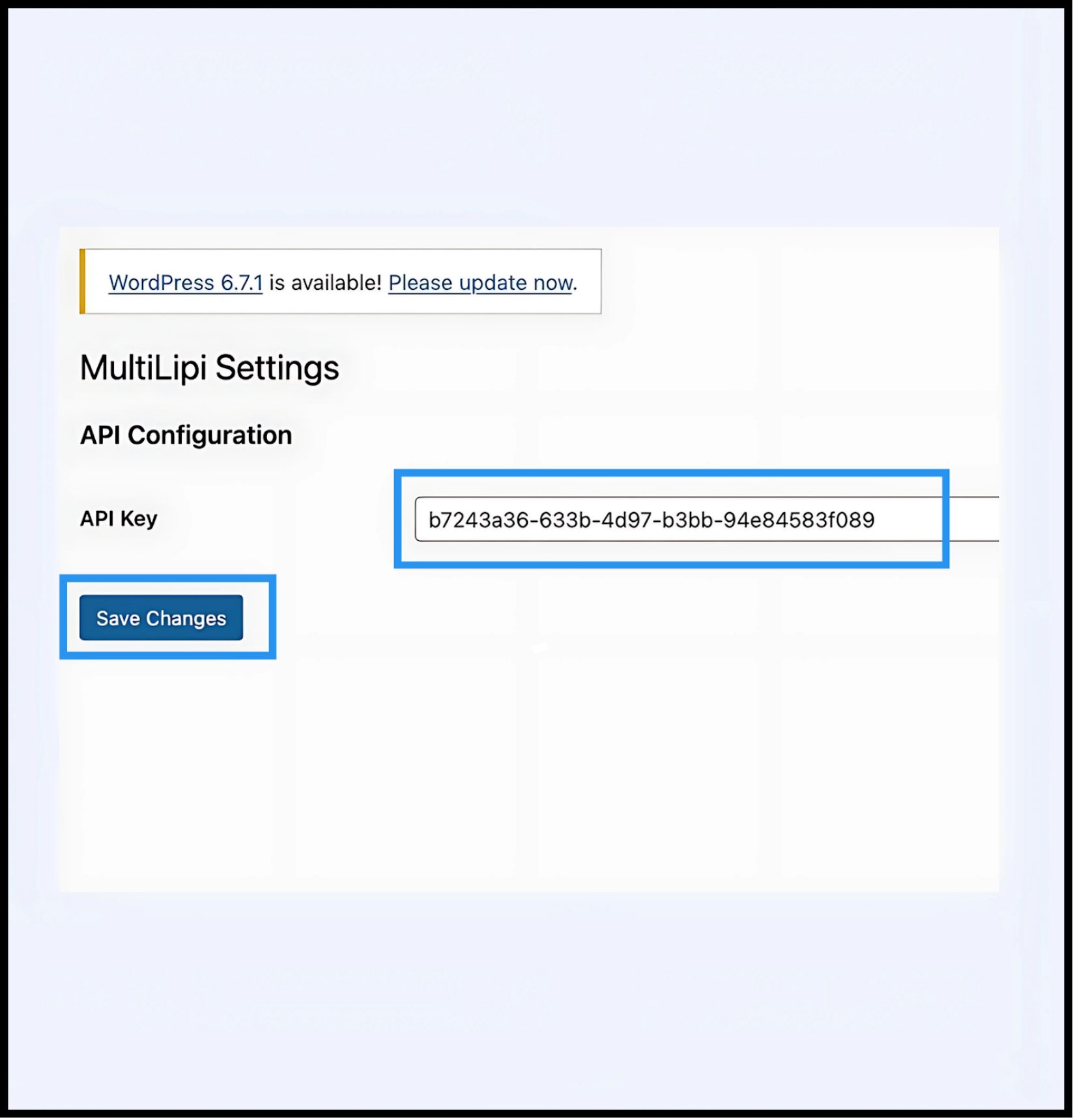
Configuração da API: Localize o Chave de API campo.
- 3
Autenticação: Cole a sua Chave de API de Projeto única (copiada do seu painel MultiLipi).
- 4
Submeter: Clique Guardar Alterações.
Resultado
O plugin valida a chave e estabelece uma ligação segura com o motor de tradução.
4. Passo 3: Verificação de Edge
Uma vez autenticada, a camada de tradução fica imediatamente ativa.
Recarregar
Visite o seu site público.
Verificação Visual
O Seletor de Idioma deve aparecer no canto inferior esquerdo (posição predefinida).
Teste Funcional
Alterne entre os idiomas e verifique se o conteúdo é traduzido instantaneamente.
Protocolo de Resolução de Problemas
- •Limpeza de Cache: Se utilizar
- •Verificação de Conflitos: Certifique-se de que nenhum outro plugin de tradução (como WPML ou Polylang) está ativo nas mesmas páginas, pois podem entrar em conflito com a injeção de DOM.
5. Gestão Pós-Implementação
Com o plugin ativo, o seu site WordPress está agora sincronizado com a nossa infraestrutura.
Glossário e SEO
Não precisa de gerir traduções dentro do WordPress. Inicie sessão no seu Painel MultiLipi para definir Regras de Glossário, configure etiquetas Hreflang, e gerir URLs Traduzidas.
Substituições Visuais
Use o Editor Visual no painel do MultiLipi para corrigir quaisquer problemas de esquema causados pela expansão de texto (por exemplo, em alemão ou russo).
Atualizações
Todas as edições de tradução efetuadas na nuvem do MultiLipi refletem-se instantaneamente no seu site WordPress, sem necessidade de atualizar o plugin ou limpar novamente as caches.