

To effectively budget for your global expansion, you need complete transparency into how MultiLipi quantifies "work." At MultiLipi, we don't just count traditional words; our underlying metering engine calculates Tokens using the advanced Gemini Tokenizer. This guide provides a granular breakdown of how our calculation engine works, why we use tokens instead of standard word counts, and how our Smart Deduplication technology saves you money.
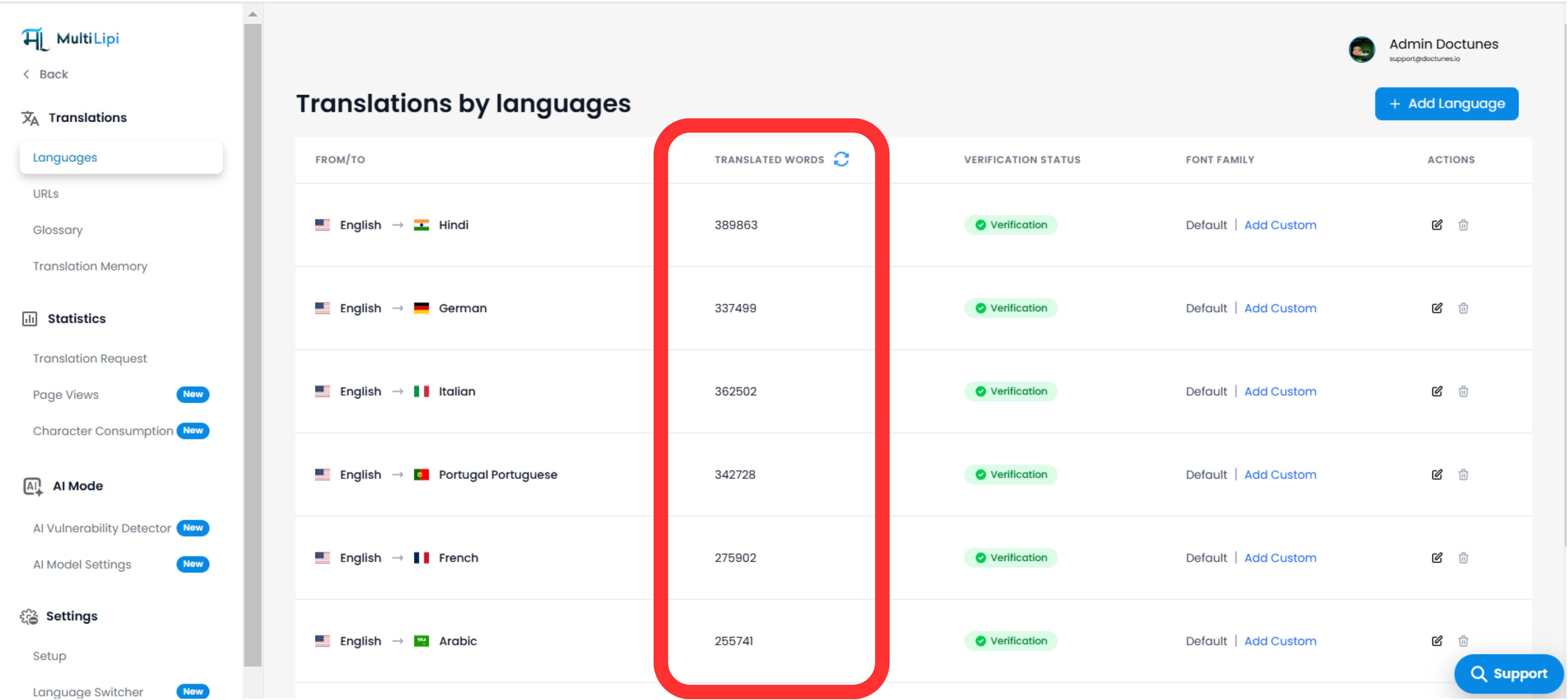
Painel de contagem de palavras em tempo real mostrando métricas de tradução por idioma
1. Why Tokens Over Words?
The fundamental flaw of traditional word counting
If you are expanding globally, relying on standard "word counts" is fundamentally flawed. Traditional word counters rely on spaces to separate words—a system that works well for English, but breaks down entirely for non-Latin scripts.
Consider languages like Japanese, Chinese, or Thai, which do not use spaces between characters. A traditional word counter might read an entire Japanese sentence as a single "word," making it impossible to accurately measure or bill for translation services.
The Two-Step Engine: Google Translate + Gemini
To deliver the highest quality translations, MultiLipi utilizes a powerful two-step process:
1. Foundational Translation:
We first process your content through Google Tradutor for a high-speed, highly reliable initial translation.
2. Context & Accuracy Check:
We then pass this initial translation through the Gemini LLM to refine the context, fix localization nuances, and ensure maximum accuracy.
Because Gemini acts as our final quality-assurance and Generative Engine Optimization (GEO) engine, we use its advanced Gemini Tokenizer to calculate usage.
What is a Token?
What is a Token?
A token is a piece of a word or a distinct linguistic unit. For example, a short English word might be one token, while a complex word might be broken into two or three.
Total Accuracy:
By counting tokens, our system accurately gauges the exact volume of linguistic data being processed, regardless of the language's script, grammar, or spacing rules.
Fairness:
This guarantees that you are charged fairly based on the true complexity and length of your content, ensuring precise billing for our global users.
Observação: While your MultiLipi dashboard may display "Words" for simplicity and general familiarity, this metric is a direct, normalized reflection of your exact Token usage.
2. The Multiplier Effect
How languages multiply your token usage
Your plan utilization is determined by the total volume of source tokens processed, multiplied by your target languages. Because each language requires a distinct neural translation pass through our two-step engine, adding a language acts as a multiplier.
A Fórmula:
[Source Tokens] × [Number of Target Languages] = Total Usage
Cenário de Exemplo:
Sua Página Inicial: ~1,000 words (approx. 1,300 tokens)
Ação: You translate it into French and Japanese
Cálculo: 1,300 tokens × 2 languages = 2,600 Total Tokens Used
3. Smart Deduplication
How We Save Your Quota
Este é o conceito mais crítico para a eficiência.
MultiLipi utilizes an intelligent Memória de Tradução (TM). We never charge you to translate the exact same string twice.
Conteúdo Repetido (Cabeçalhos/Rodapés):
Se o seu site tem um rodapé com o texto "Copyright 2026 All Rights Reserved" that appears on 500 pages, we only tokenize and translate it Uma vez. Our system identifies the string hash and automatically applies the existing translation from your secure Azure Blob Storage to all 500 pages.
Result: You pay for the distinct content segment, not for page views or site-wide repetitions.
4. The "Invisible" Layers
O Que Mais é Contado?
Many users are surprised to see a usage count slightly higher than their visible paragraph text. This is because MultiLipi is deeply optimized for Otimização do Motor Generativo (GEO) e ainda SEO Multilingue. We translate your entire infrastructure, not just the visible UI.
Our metering engine tokenizes and translates:
Interface Visível
Parágrafos, Títulos (H1-H6), Botões e Itens de Menu.
Metadados SEO
- Títulos e Descrições Meta: Critical for click-through rates in global search engines.
- Etiquetas OpenGraph: Content used when your links are shared on social media like LinkedIn or X.
Accessibility & Alt Layers
- Texto alternativo da imagem: (
- Cargas Dinâmicas: Texto injetado via JavaScript (por exemplo, mensagens de erro, pop-ups, notificações toast).
GEO Assets
The content used to dynamically generate your localized llms.txt e ainda Schema.org markdown files for AI crawlers.
5. Updates & Revisions
A Lógica "Diff"
O que acontece quando você edita seu site?
Pequenas Edições:
If you change a single sentence on a page, our engine detects the "Difference." You are only charged tokens for the new sentence, not the re-translation of the entire page.
Reestruturação de HTML:
Be aware that if you significantly change the underlying HTML structure wrapping a piece of text, the system may recognize it as a new distinct segment that requires a fresh translation pass.
6. How to Optimize Your Usage
Strategies to conserve your quota and maximize platform efficiency
Excluir "Linguagem Legal"
Use MultiLipi's Exclusion Rules to block translation on Terms of Service or Privacy Policy pages, which are often long and legally required to remain in English (depending on your jurisdiction).
Bloquear Conteúdo Gerado pelo Usuário
If you have an active comments section or a live reviews widget, exclude that specific HTML block or CSS class from translation to prevent visitors from eating up your token quota.
Auditar Seus Idiomas
Remove underperforming target languages from your dashboard to instantly stop new tokens from accumulating for that region.
7. Monitoring & Verification
Audit your exact consumption in real-time
You can audit your exact consumption in real-time right from your MultiLipi Dashboard.
Vista do Painel:
Navegue para Traduções → Idiomas.
Resumo por Idioma:
We show the specific utilized count for each language pair (e.g., EN → JA).
Sincronização em Tempo Real:
Click the Refresh Icon 🔄 next to your counter to trigger a live re-calculation of your index based on our latest Token-to-Word mapping.
By shifting the paradigm from archaic "word counting" to precise LLM Tokenization, MultiLipi guarantees a transparent, 100% accurate, and highly scalable localization process for your business.