

Localize os seus permalinks para máxima visibilidade orgânica e CTR.
Em SEO Internacional, a estrutura do seu URL é o primeiro sinal que um utilizador vê nos resultados de pesquisa. Se o seu conteúdo estiver em espanhol, mas o seu URL permanecer em inglês (por exemplo, /es/pricing), cria uma "Incompatibilidade de Idioma" que diminui a confiança e a Taxa de Cliques (CTR).
da MultiLipi Motor de Tradução de Slugs elimina esta fricção. Traduz automaticamente os segmentos do caminho do seu URL (slugs) para a língua de destino, garantindo que a sua arquitetura de roteamento corresponde ao seu conteúdo.
- Inglês:
example.com/pricing - Espanhol:
example.com/es/precios - Alemão:
example.com/de/preise
1. A Vantagem SEO
Porquê localizar a sua camada de encaminhamento?
Relevância de Palavras-chave
Os motores de busca destacam palavras-chave no URL. Traduzir o slug coloca as suas palavras-chave alvo (por exemplo, "preços") diretamente no link, impulsionando a classificação para consultas locais.
Fluência Cognitiva
Um URL totalmente localizado parece nativo. Sinaliza para o utilizador, "Esta página é realmente para mim," em vez de "Esta é apenas uma cópia traduzida automaticamente."
Consistência Estrutural
Alinha os seus breadcrumbs e a arquitetura do site, criando uma hierarquia lógica para os rastreadores.
2. Protocolo de Configuração
Ativar o motor de encaminhamento.
Para ativar a tradução automática de caminhos, siga estes passos no seu centro de comando:
Aceder ao Contexto do Projeto
- Inicie sessão na sua Painel MultiLipi.
- Navegue até Projetos na barra lateral esquerda para ver as suas integrações ativas.
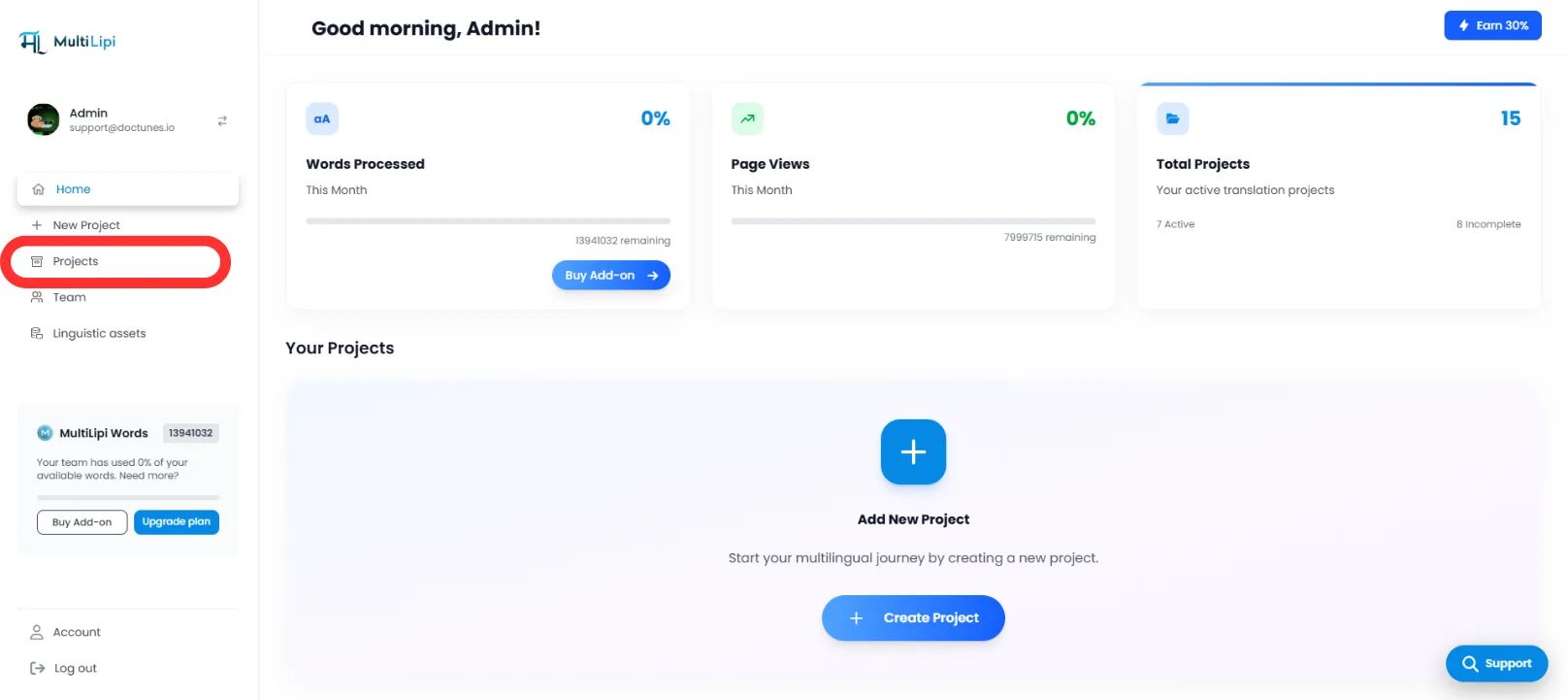
Selecionar Arquitetura de Destino
- Localize o projeto/website específico que deseja configurar.
- Clique no Separador de Projeto Desejado para entrar nas suas configurações.
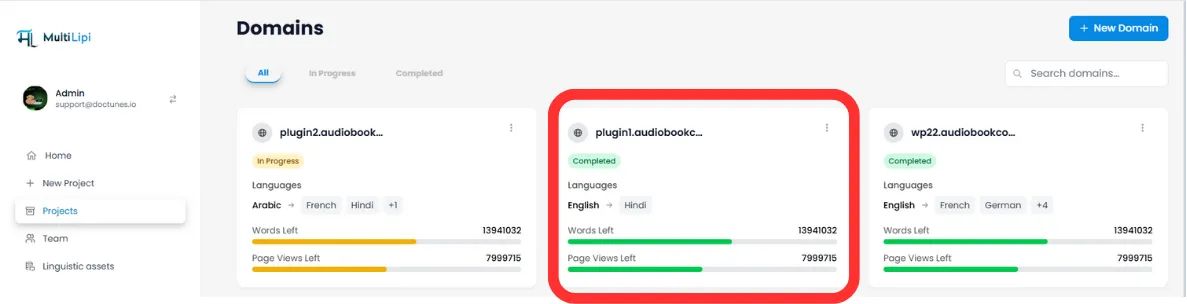
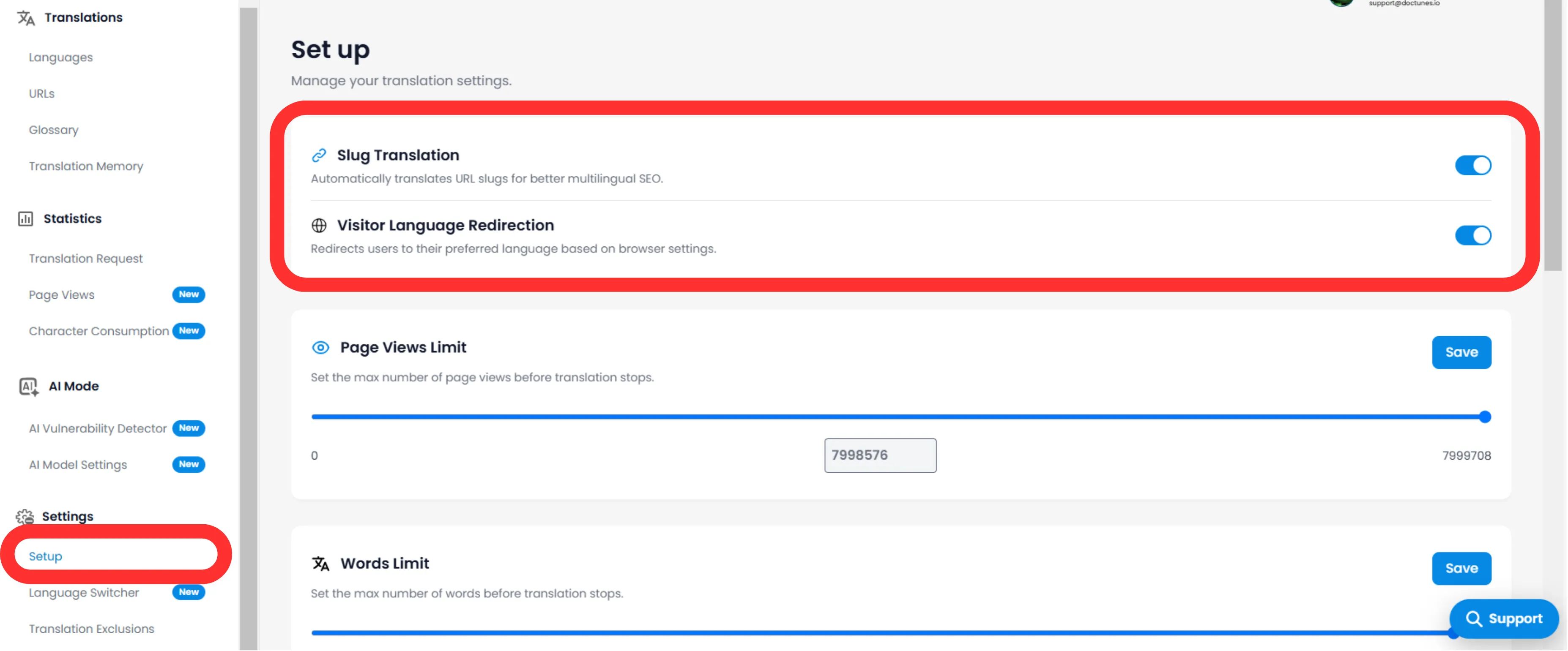
Aceder à Configuração
- No submenu do projeto (lado esquerdo), clique em Definições.
- Selecionar Configuração.
Ativar Motor de Slug
- Desloque para Tradução de Slug secção.
- Ação: Mude o interruptor para LIGADO (Azul).
- Ação do Sistema: O motor irá agora intercetar pedidos de URL e servir o slug localizado para todas as línguas de destino.
3. Comportamento Técnico
Como lida com redirecionamentos.
Uma vez ativado, o sistema gere o mapeamento automaticamente.
Redirecionamentos 301
Se um utilizador (ou bot) tentar aceder ao URL antigo não traduzido (/es/pricing), MultiLipi redireciona-os automaticamente com um 301 para o novo URL otimizado (/es/precios). Isto preserva o seu link equity (sumo SEO).
Injeção de Sitemap
Os seus sitemaps XML serão atualizados automaticamente para listar estes novos URLs localizados para o Googlebot rastrear.
🌐 Localização Automática de URLs: Ao traduzir os seus slugs de URL, cria uma experiência internacional contínua que aumenta tanto as classificações SEO como a confiança do utilizador em todos os mercados-alvo.