
A verdadeira localização vai além do corpo da página; inclui a própria estrutura do URL. A "Tradução de Slugs" converte o caminho semântico das suas ligações (por exemplo, /about-us) para o idioma de destino (por exemplo, /a-propos or /sobre-nosotros). Isto é crucial para SEO Multilingue, uma vez que os motores de busca dão prioridade a URLs que correspondem à intenção de pesquisa do utilizador no seu idioma nativo.
Este guia detalha a protocolo de configuração, gestão de colisões e lógica de encaminhamento para localização profunda de URLs.
1. Protocolo de Ativação
Ativar a localização profunda.
Por predefinição, o MultiLipi tenta traduzir os slugs para maximizar o SEO. No entanto, deve verificar esta configuração nas definições do seu projeto.
Passo 1: Aceder às Definições do Projeto
- •Inicie sessão na sua Painel MultiLipi.
- •Navegue até Definições na barra lateral esquerda.
- •Selecionar Configurações do Projeto a partir do submenu.
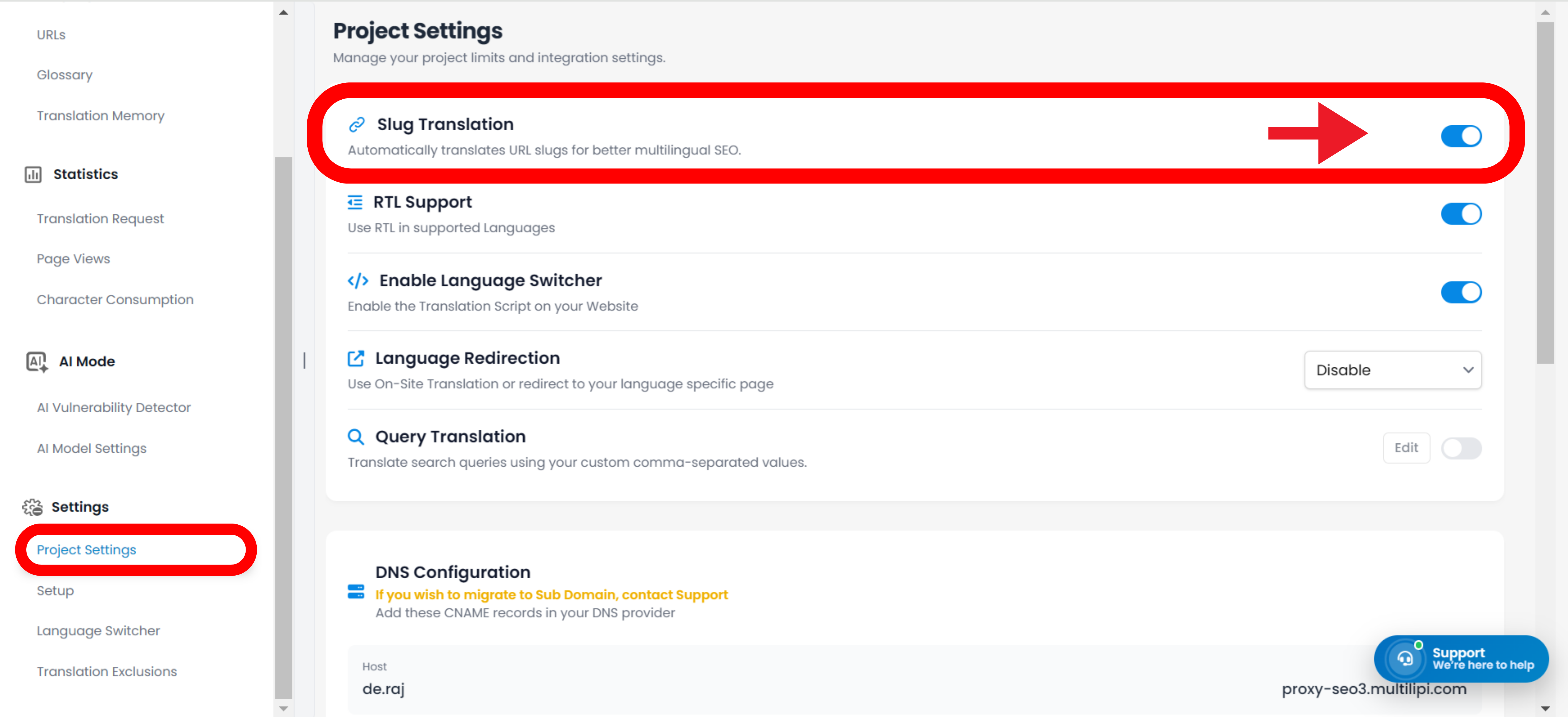
Passo 2: Ativar o Módulo
- •Desloque-se para baixo até à secção Tradução de Slug secção.
- •Ação: Certifique-se de que o interruptor está definido para
LIGADO(Posição azul).
O motor gerará automaticamente URLs localizadas para todas as páginas novas e existentes (por exemplo, /contact → /contacto).
Os URLs permanecerão em inglês, mesmo nas páginas traduzidas (por exemplo, /es/contact).
2. Atualizações Automatizadas de Topologia (Reescrita de Ligações)
Como o sistema gere a navegação interna.
Uma das funcionalidades mais poderosas do motor de Tradução de Slugs é a Reescrita Automatizada de Ligações.
O Mecanismo:
Quando um slug é traduzido (por exemplo, /shop → /boutique), o MultiLipi analisa as suas páginas localizadas em busca de ligações internas que apontem para o URL antigo.
A Ação:
Reescreve automaticamente as tags <a href="..."> no HTML para apontarem para o novo slug localizado.
O Resultado:
Os utilizadores permanecem dentro do ecossistema localizado. Um utilizador francês que clique em "Shop" é direcionado para /boutique e não de volta para /shop.
3. Gestão: Substituição Manual
Controlo de precisão para palavras-chave de URL.
Embora a nossa IA crie slugs otimizadas para SEO de forma automática, poderá pretender refinar manualmente um URL para segmentar palavras-passe locais específicas ou corresponder a uma campanha de marketing.
- •Navegue até às Traduções seção do seu painel de controlo.
- •Localize a linha da página específica que pretende modificar.
- •Clique Editar Slug junto à pré-visualização do URL.
- •Entrada: Escreva a sua string preferida (por exemplo, alterar
/productsto/boutique). - •Submeter: Clique
Guardar Alterações.
Nota: O sistema atualizará imediatamente o mapa de encaminhamento interno para servir conteúdos neste novo endereço.
4. Protocolo de Gestão de colisões
Prevenção de conflitos de encaminhamento.
Em alguns idiomas, duas palavras inglesas diferentes podem ser traduzidas para a mesma palavra estrangeira, criando uma Colisão de Slugs.
Cenário:
Tem /store (retalho) e /shop (verbo). Ambas podem ser traduzidas automaticamente para /boutique em francês.
O Risco:
URLs duplicados confundem os motores de busca e causam erros de encaminhamento.
A Solução:
Use o Substituição Manual (Passo 3) para os diferenciar (por exemplo, manter /boutique para a loja e utilizar /acheter para o verbo).
5. Estratégia de Redirecionamento Legado (301s)
Gestão de alterações em URLs ativos.
Se decidir alterar um slug traduzido depois de o Google já o ter indexado (por exemplo, alterar /fr/a-propos to /fr/notre-histoire), deve garantir que os utilizadores não encontram um erro 404.
Melhores Práticas:
Configure um Redirecionamento 301 no seu CMS subjacente (WordPress/Shopify/Webflow).
Fluxo de trabalho:
Redirecione o padrão de URL traduzido antigo para o novo padrão de URL traduzido para preservar o seu SEO "link juice."
6. Integração Universal de CMS
Encaminhamento agnóstico em relação à plataforma.
Uma vez que o MultiLipi opera como uma camada de proxy, a tradução de slugs funciona independentemente do seu backend.
Plataformas Suportadas:
WordPress, Shopify, Webflow, Wix, Squarespace e HTML Personalizado.
Sem Configuração de Backend:
Não precisa de criar estas páginas no seu CMS. O MultiLipi mapeia virtualmente o pedido /fr/boutique para a sua página /shop original, ao mesmo tempo que apresenta o conteúdo traduzido.