
A tradução é um investimento; o tráfego é o retorno. O Visualizações de Página O dashboard é a sua unidade central de telemetria para compreender o comportamento do utilizador nos seus subdomínios localizados. Ao contrário das análises genéricas, esta vista foi especificamente arquitetada para rastrear a interação multilíngue, ajudando-o a correlacionar idiomas específicos com regiões e dispositivos específicos.
Este guia detalha o protocolo de navegação e os cinco módulos de inteligência principais dentro deste dashboard.
2. Os Módulos de Inteligência
A decompor os sinais de dados.
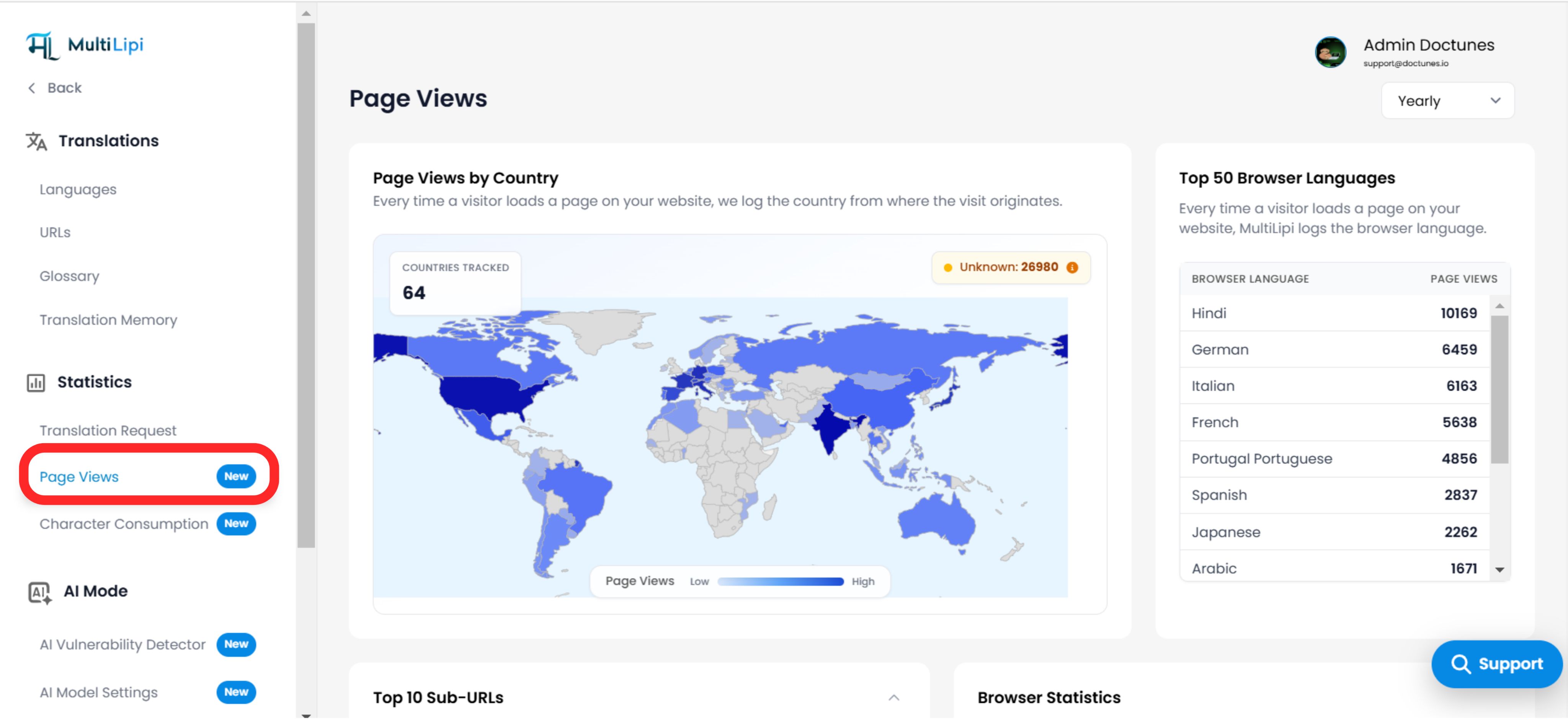
A. Inteligência Geoespacial (Visualizações de Página por País)
Visualização: Um mapa coroplético codificado por cores destacando a densidade global.
As Métricas:
Mapa de Calor: Regiões mais escuras indicam maior volume de tráfego.
Distintivo Desconhecido: Indicador superior direito para tráfego onde a geolocalização IP falhou (por exemplo, VPNs ou IPs mascarados).
Contagem Total: Contador superior esquerdo mostrando o número de países ativos.
Valor Estratégico: Valida a penetração no mercado. Se ativou a segmentação "Francês" para França, mas vê um pico no "Canadá", poderá ter de ajustar a sua estratégia de dialeto (fr-FR vs. fr-CA).
B. Demografia Linguística (Top 50 Idiomas de Navegador)
Visualização: Uma lista classificada dos cabeçalhos Accept-Language detetados dos seus visitantes (por exemplo, Hindi, Alemão, Italiano).
Valor Estratégico: Este é o seu Indicador de Procura.
Cenário: Ainda não traduziu o seu site para japonês, mas "japonês" aparece nos seus Top 10 idiomas de navegador.
Ação: Este é um sinal claro para ativar o japonês imediatamente para capturar esta procura existente.
C. Velocidade de Conteúdo (Top 10 Sub-URLs)
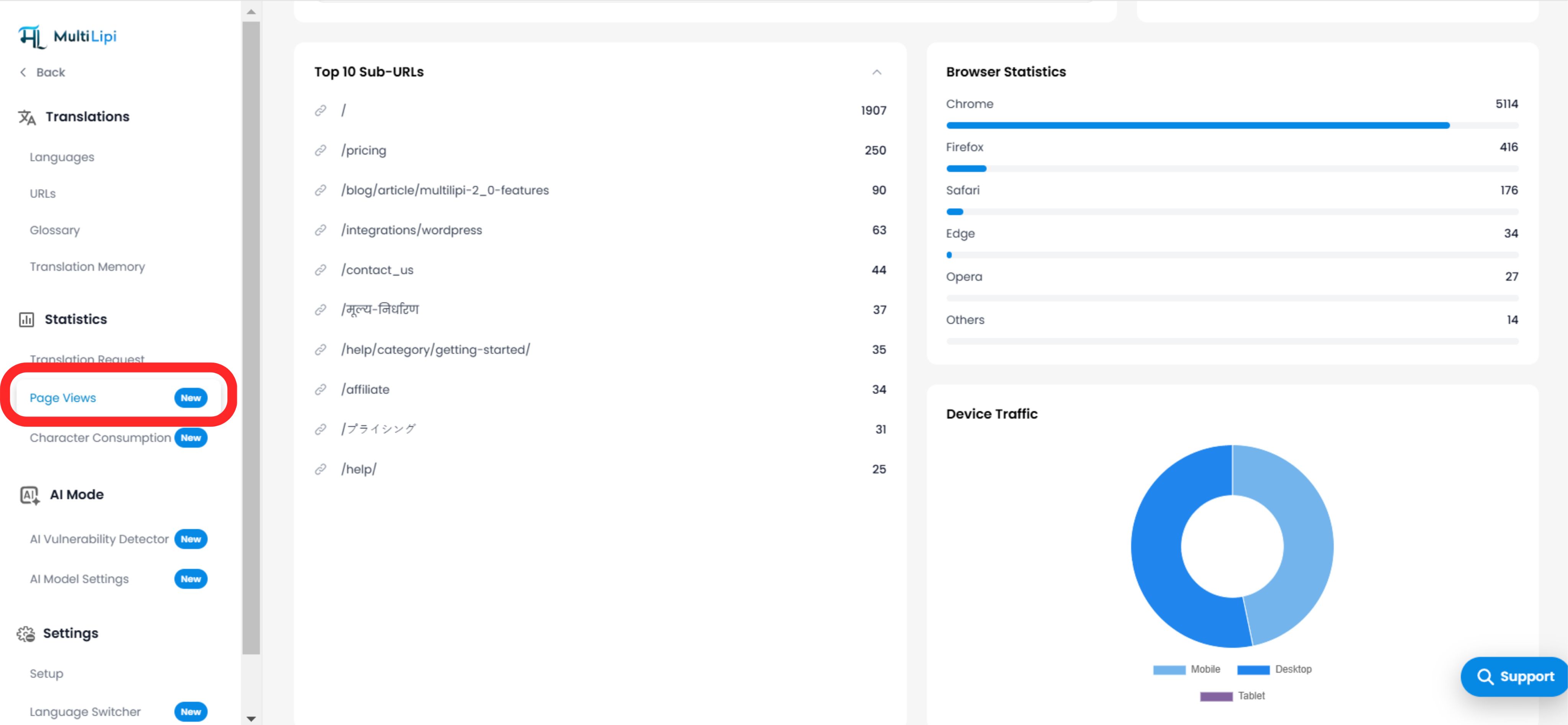
Visualização: Uma tabela de classificação dos seus caminhos mais acedidos (por exemplo, /precos, /blog/features).
Valor Estratégico: Priorização.
Informação: Se /precos é a sua página #1 traduzida, deve investir em Revisão Humana para esse URL específico para garantir que a cópia de conversão é perfeita, enquanto deixa as publicações de blog com menor tráfego para a IA.
D. Análise do Agente de Utilizador (Navegador e Dispositivo)
Estatísticas do Navegador: Um gráfico de barras a detalhar a utilização por cliente (Chrome, Safari, Edge, Firefox).
Caso de Uso: Depuração. Se o tráfego "Safari" tiver uma taxa de rejeição de 100%, o seu seletor de idioma pode estar avariado no iOS.
Tráfego do Dispositivo: Um gráfico de rosca a dividir o tráfego entre Desktop, Mobile e Tablet.
Caso de Uso: Otimização. Se 80% do seu tráfego espanhol for "Telemóvel", certifique-se de que as suas strings de texto em espanhol são curtas o suficiente para caber em ecrãs pequenos sem quebrar a UI.
3. Granularidade Temporal (Filtros de Tempo)
Aumentar o zoom nos dados.
Use o filtro de menu suspenso no canto superior direito para ajustar a janela de análise:
Anual: Identificar macro-tendências e sazonalidade.
Mensal: Acompanhe o crescimento mês a mês após um lançamento de localização.
Semanal: Monitorizar o impacto imediato de uma campanha de marketing.
4. Síntese Estratégica
Como agir sobre estes dados.
O Ciclo de Otimização:
Verificar Idiomas do Navegador: Identificar um idioma não traduzido com alta procura.
Ativar Idioma: Adicione-o ao seu projeto.
Verificar Mapa do País: Verifique se o tráfego começa a fluir da região relevante.
Verificar Principais URLs: Veja quais páginas estes novos utilizadores estão a visitar e refine as traduções aí primeiro.