
1. O Protocolo de Auditoria
Passo 1: Aceder ao Contexto do Projeto
Inicie sessão no seu Painel MultiLipi.
Na barra lateral esquerda, em Traduções secção, clique no seu projeto atual para abrir as suas definições específicas.
Passo 2: Aceder ao Mapa de Roteamento
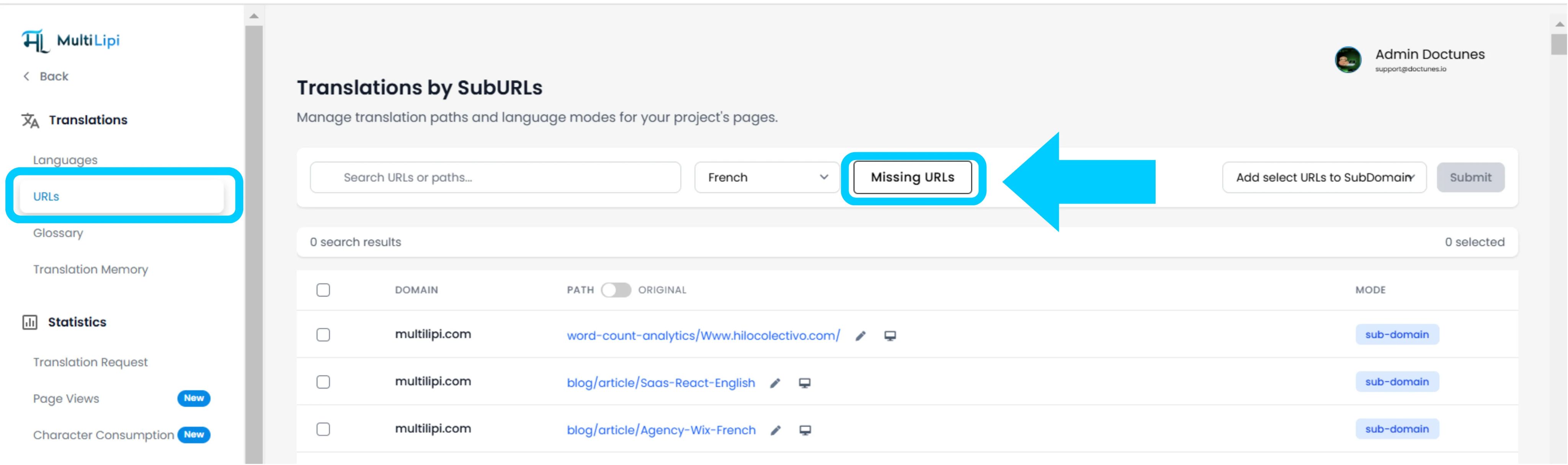
Dentro da vista do projeto, clique em URLs opção na barra lateral.
Contexto: Este painel exibe o registo de todos os caminhos atualmente rastreados e traduzidos.
Passo 3: Definir Contexto Alvo
Localize o menu suspenso ao lado da barra de pesquisa.
Ação: Selecione o idioma específico que deseja auditar (por exemplo, francês).
Lógica: O sistema irá agora comparar o índice de origem (inglês) com o índice francês.
Passo 4: Executar Análise
Clique no URLs em Falta botão.
Ação do Sistema: O motor analisa o seu domínio de origem em busca de caminhos válidos que estejam ausentes do mapa de idiomas atual.
2. Ingestão e Sincronização
Resumo da Auditoria
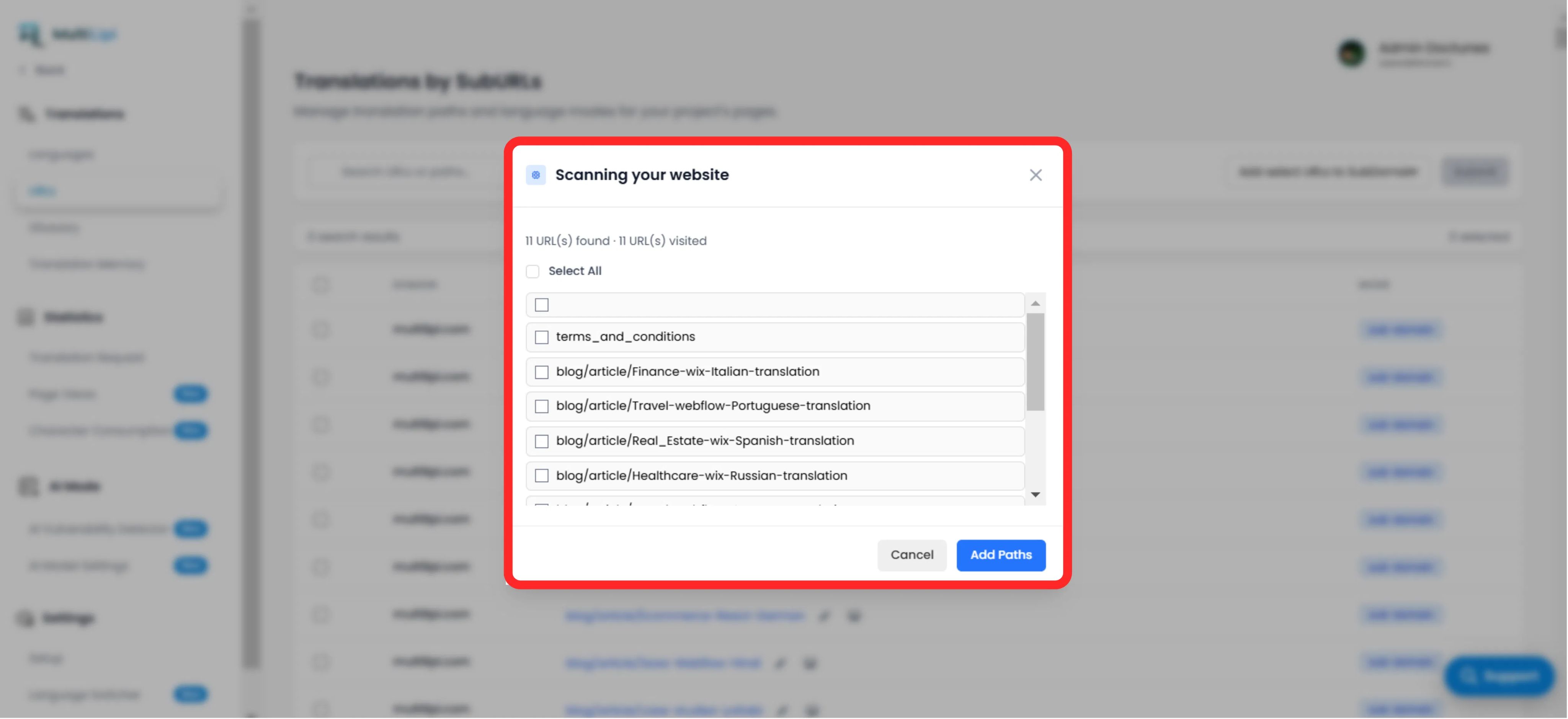
Exibe o número total de caminhos não traduzidos encontrados.
Lista de Caminhos
Uma lista granular de cada URL específico (por exemplo, /blog/new-feature) que falta no idioma de destino.
O Protocolo de Correção
Seleção: Verifique manualmente as caixas de seleção para páginas específicas, ou clique em "Selecionar Tudo" para sincronizar todo o lote.
Submeter: Clique no botão "Adicionar Caminhos".
Resultado: Estes URLs são imediatamente adicionados à fila de tradução. O sistema irá agora gerar as versões localizadas e permitir que o tráfego chegue até elas.
3. Benefícios Estratégicos
Cobertura SEO
Os motores de busca não conseguem indexar páginas que não existem. Adicionar estes URLs garante que o Google indexa todo o seu site em francês, não apenas a página inicial.
Prevenção de Pontos Mortos
Garante que, se um utilizador mudar de idioma numa página profunda, não é devolvido à página inicial porque a tradução específica estava em falta.
Descoberta Automatizada
Elimina a necessidade de folhas de cálculo manuais para acompanhar quais as publicações do blog foram traduzidas.
Dica Pro
Após ingerir novos caminhos, navegue para Modo IA > Detetor de Vulnerabilidades para executar uma verificação imediata de saúde SEO nestas páginas recém-criadas para garantir que estão otimizadas para o lançamento.