
Os modelos de tradução de IA são poderosos, mas podem ser demasiado criativo. Um glossário atua como um "Camada de Proteção," forçando o motor de tradução a aderir às suas regras de marca específicas. Quer seja para garantir "Apple" permanece um nome de marca (e não uma fruta) ou mantendo isenções de responsabilidade legais textuais, o Gestor de Glossário MultiLipi dá-lhe controlo absoluto.
Este guia abrange os dois métodos para definir estas regras: Entrada Manual (Precisão) e Ingestão CSV (Em Massa).
Aplicar Consistência Rigorosa de Terminologia
Os glossários substituem as decisões de tradução de IA para manter a integridade da marca. Use-os para nomes de empresas, SKUs de produtos, termos legais, jargões técnicos e palavras-chave SEO de alto valor que devem permanecer consistentes em todos os idiomas.
Aceder à Base de Termos
O Glossário é uma configuração global que se aplica a todos os seus projetos.
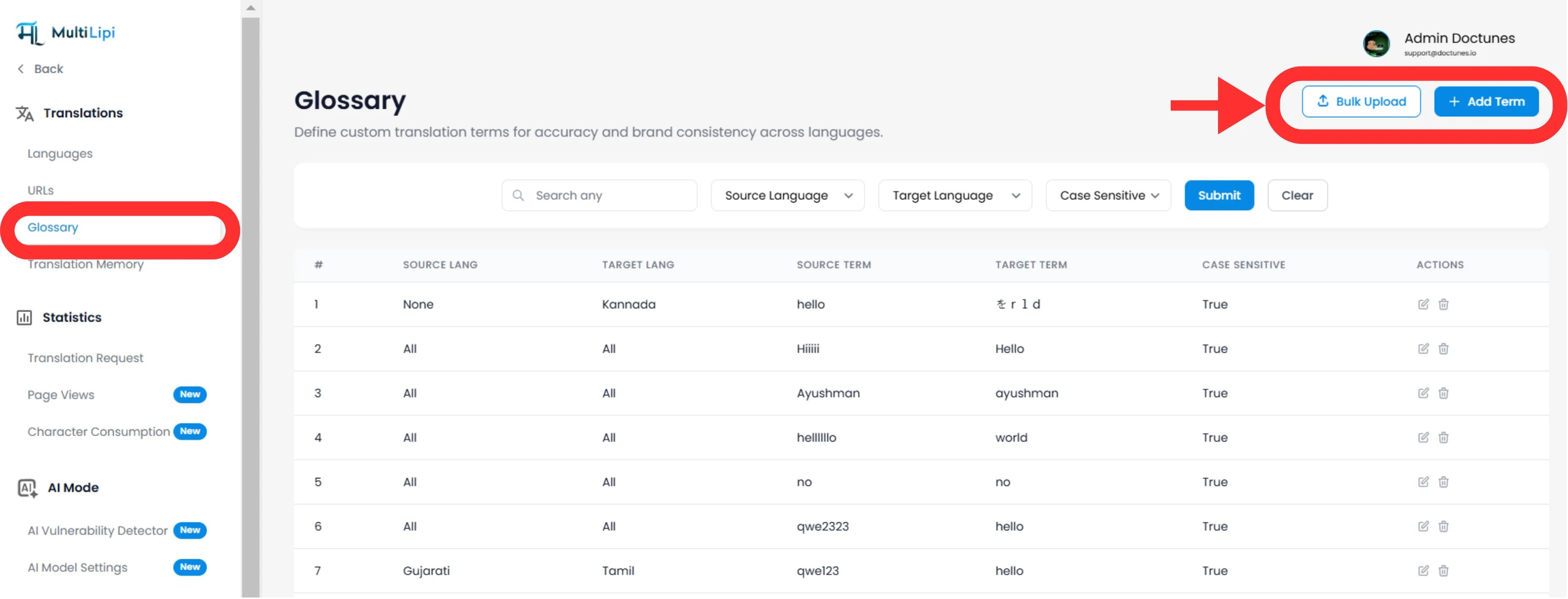
Navegar: No seu Painel MultiLipi, expanda a Traduções no menu lateral.
Selecionar: Clique Glossário.
Ver: Verá uma tabela pesquisável de todas as regras ativas, os seus pares de idiomas e o estado de sensibilidade a maiúsculas/minúsculas.
Método 1: Definição de Regra de Precisão (Manual)
Melhor para:
Bloqueio de nomes de marca, SKUs de produtos e slogans de marketing específicos.
Iniciar
Clique no Novo botão no canto superior direito.
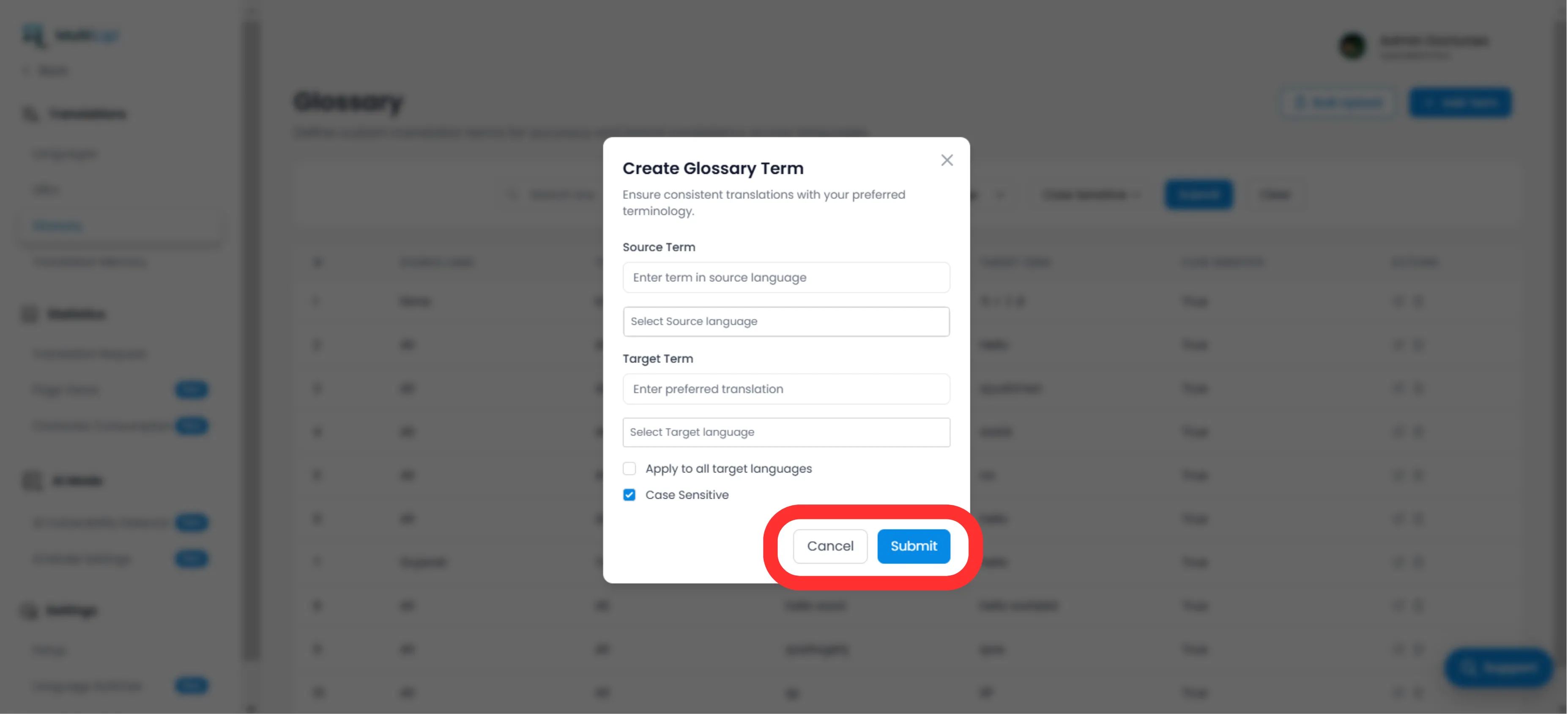
Definir a Regra
Termo de Origem
A palavra ou frase exata no seu idioma original (por exemplo, "CloudDrive").
Termo de Destino
A tradução mandatória (por exemplo, "CloudDrive" - para o manter em inglês, ou "Le CloudDrive").
Âmbito de Idioma
Específico
Aplicar apenas a EN → FR.
Global
Selecionar "Todos os Idiomas" para bloquear um nome de marca em todo o mundo.
Sensibilidade a Maiúsculas/Minúsculas
Ativado
Correspondências "Apple" mas ignora "apple". Essencial para palavras comuns que também são nomes próprios.
Implementar
Clique Submeter. A regra é imediatamente enviados para o motor de tradução e aplicar-se-á a todas as traduções futuras.
Método 2: Ingestão em Massa (Upload CSV)
Melhor para:
Migração de bases de termos legadas, dicionários jurídicos ou listas de produtos de comércio eletrónico.
Se tiver centenas de termos, não os introduza manualmente. Use o nosso ferramenta de importação CSV.
Preparar os Seus Dados
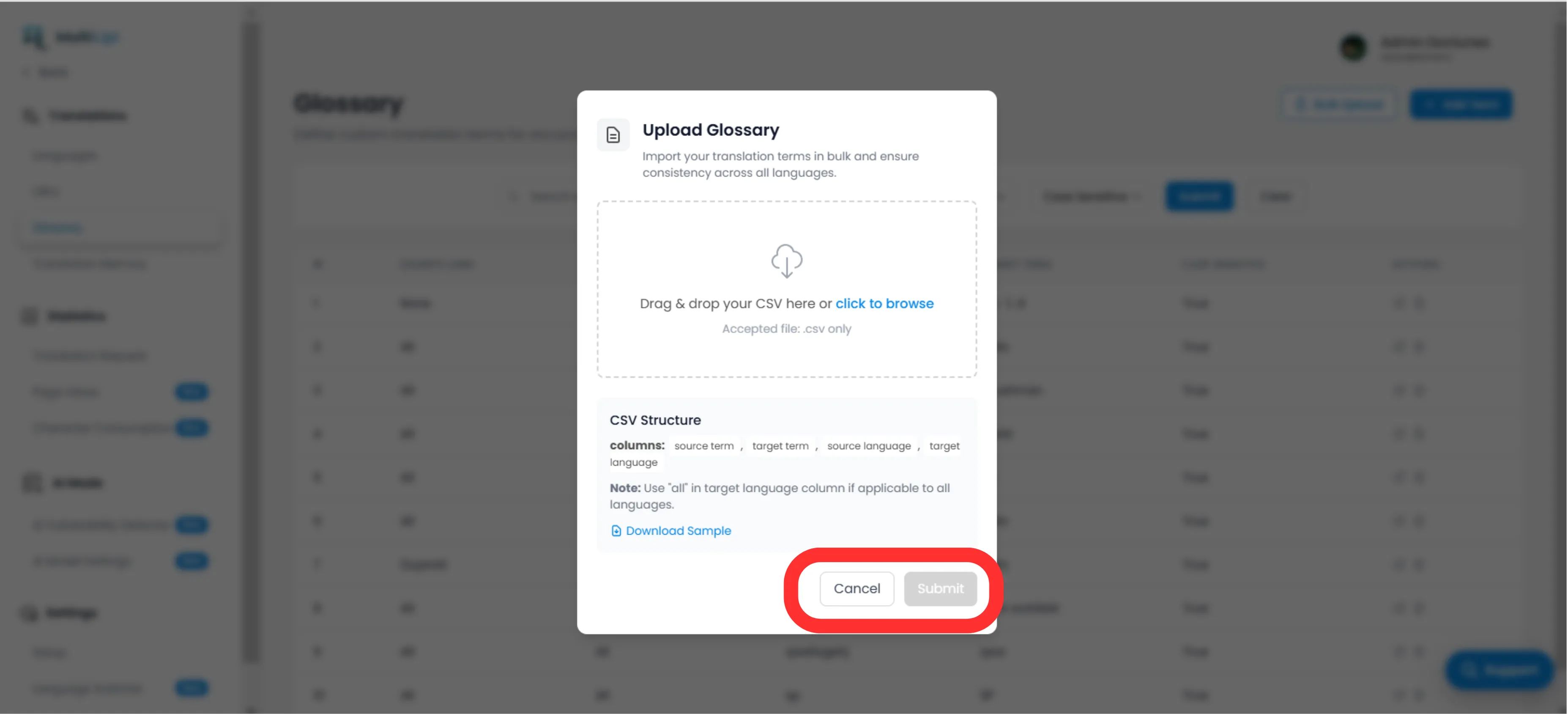
Crie um ficheiro CSV com a seguinte estrutura de cabeçalho:
termo_origem, termo_destino, idioma_origem, idioma_destinoNota
Use Códigos ISO para idiomas (por exemplo, en, fr, de). Utilize tudo para regras globais.
Carregar
Clique no Carregar botão no painel de Glossário.
Mapear e Validar
Selecione o seu ficheiro. O sistema irá analisar as linhas e assinale quaisquer erros de formatação.
Executar
Clique Submeter para ingerir as regras na sua Base de Termos ativa.
Melhores Práticas Estratégicas
Proteja a Sua Marca
A primeira regra que deve criar é para o seu Nome da Empresa. Defina o destino para ser idêntico à origem e aplicá-la a Todos os Idiomas.
Palavras-chave SEO
Se estiver a direcionar para um específico palavra-chave de alto volume na Alemanha (por exemplo, "Handy" em vez de "Mobiltelefon"), crie uma regra de glossário para forçar o motor a usar o termo de maior tráfego.
Mantenha-o Curto
Os glossários funcionam melhor para frases de 1-3 palavras. Não os utilize para frases inteiras; use a Memória de Tradução or Editor Visual para isso.
Pronto para impor a consistência da marca? Abra o Gestor de Glossário e comece a definir as suas regras de tradução hoje mesmo.