
Desbloquear a Camada de Otimização de IA
A tradução padrão substitui palavras. Otimização LLM MultiLipi reformula o seu conteúdo para a era da IA. Ao ativar esta funcionalidade, ativa uma "Camada Inteligente" que otimiza as suas traduções para Relevância Cultural, Precisão Contextual, e Otimização por Motor Generativo (GEO).
Esta funcionalidade garante que o seu site multilingue não é apenas legível por humanos, mas também estruturalmente otimizado para ser descoberto por agentes de IA como o ChatGPT, o Gemini e o SearchGPT.
Ativa a retenção de contexto inteligente para traduções naturais
Injeta sinais de schema localizados para melhores classificações
Ativa modelos de tradução de nível superior
📌 Duas Formas de Ativar: Escolha com base em se está a configurar um novo projeto ou a atualizar um existente.
Método 1: Durante a Configuração de Novo Projeto
Quando adicionar um novo website ao MultiLipi, pode ativar a Otimização LLM diretamente no fluxo de integração para garantir que a sua primeira rastreagem seja compatível com IA.
Iniciar o Fluxo "Adicionar Projeto"
Introduza o URL do seu website e avance para Passo 2: Configure o seu Idioma.
Selecionar Idiomas de Destino e Setor
- Escolha os idiomas para os quais deseja traduzir (por exemplo, Francês, Alemão).
- Selecione o seu específico Setor (por exemplo, SaaS, E-commerce) para ajudar a IA a compreender a terminologia do seu domínio.
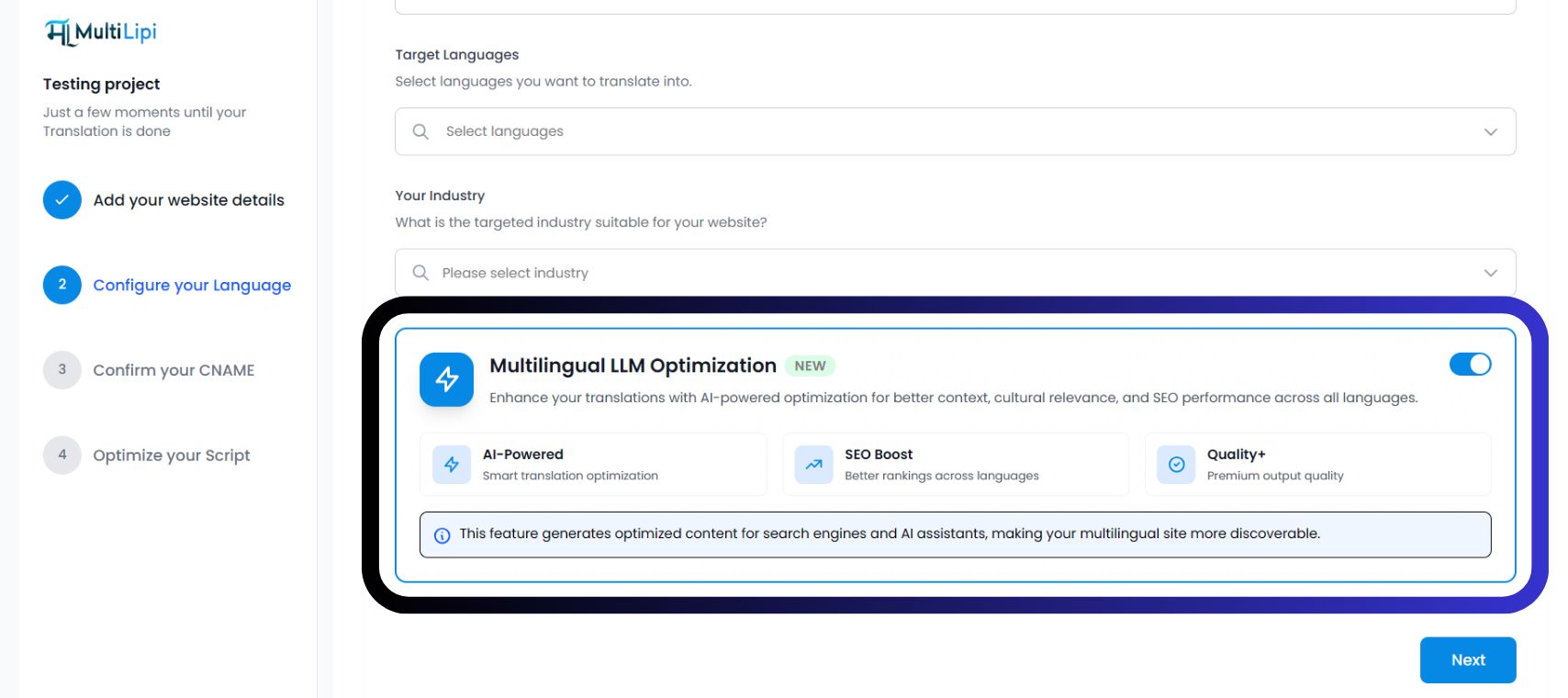
Ative "Otimização LLM Multilíngue"
Localize o Cartão de Otimização Azul. Mude o interruptor para LIGADO (Azul).
Verá três distintivos de confirmação ativos:
Clique em "Seguinte"
Prossiga para confirmar o seu CNAME e otimizar o seu script. O seu projeto será lançado com funcionalidades GEO ativas desde o primeiro dia.
Método 2: Para Projetos Existentes
Se já integrou o MultiLipi, pode ativar a Otimização LLM a qualquer momento nas definições do seu projeto.
- 1Aceder ao Painel do ProjetoInicie sessão no MultiLipi e selecione o seu projeto ativo na barra lateral.
- 2Navegue para ConfiguraçãoNo menu esquerdo, clique em Definições e depois selecione Configuração.
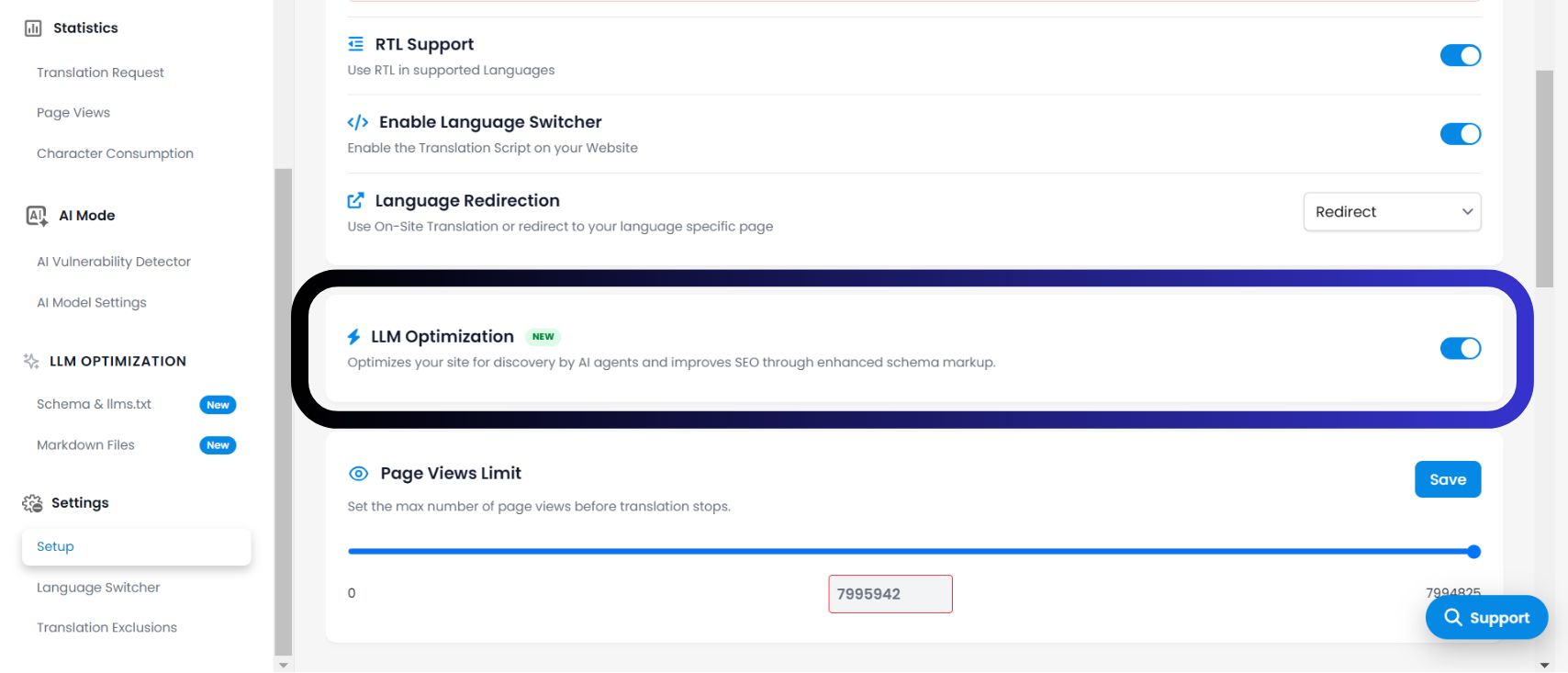
- 3Localize o Interruptor de OtimizaçãoDesloque a página para baixo, para além de "Redirecionamento de Idiomas", até Otimização de LLM secção. Ação: Mude o interruptor para LIGADO.
- 4Guardar AlteraçõesO sistema começará imediatamente a injetar sinais otimizados por IA na sua camada de tradução. Verá agora um novo OTIMIZAÇÃO LLM a secção aparece na sua barra lateral.
Porquê Ativar Isto?
De acordo com a infraestrutura apresentada no seu painel de controlo, ativar esta funcionalidade desbloqueia três vantagens cruciais:
1. Contexto Potenciado por IA (Tradução Inteligente)
Ao contrário da tradução básica, este modo compreende o "Contexto Cultural". Adapta expressões idiomáticas, metáforas e tom para se adequar ao mercado-alvo, evitando frases robóticas ou estranhas que prejudicam a confiança do utilizador.
2. Impulso de SEO (Posicionamento em Vários Idiomas)
Otimiza a estrutura do seu conteúdo para Descoberta. Garante que os motores de busca (como o Google) e os motores de resposta de IA (como o Perplexity) conseguem indexar as suas páginas traduzidas com precisão, melhorando as suas posições nas SERP locais.
3. Qualidade+ (Saída Premium)
Este modo força o motor a utilizar os nossos modelos de tradução de maior fidelidade. Prioriza a precisão e a fluência em detrimento da velocidade, garantindo que a voz da sua marca permanece consistente em mais de 100 idiomas.
Como Verificar a Ativação
✅ A infraestrutura foi atualizada?
Assim que ativar o Otimização de LLM interruptor, a interface do seu painel de controlo evoluirá imediatamente. Procure os seguintes indicadores para confirmar que o sistema está ativo:
Uma secção dedicada intitulada OTIMIZAÇÃO LLM aparecerá na barra de navegação à esquerda.
Na visão geral do seu projeto, poderá ver distintivos "Potenciado por IA" ou "Impulso SEO" ao lado da sua lista de idiomas.
Funcionalidades Desbloqueadas
🎁 O que recebo ao ativar isto?
Ativar esta funcionalidade não é apenas uma configuração; desbloqueia um conjunto de ferramentas avançadas de "Otimização de Motores Generativos" que de outra forma estariam ocultas. Ao ativar esta LIGADO, obtém acesso a: