
O seletor de idioma é o elemento de navegação principal para o seu tráfego internacional. O MultiLipi fornece um editor de interface dupla, permitindo controlar o comportamento e a estética deste elemento independentemente para os ambientes de desktop e mobile.
Este guia abrange a configuração do Layouts, Posicionamento, e Estilo da Marca através do Centro de Comando MultiLipi.
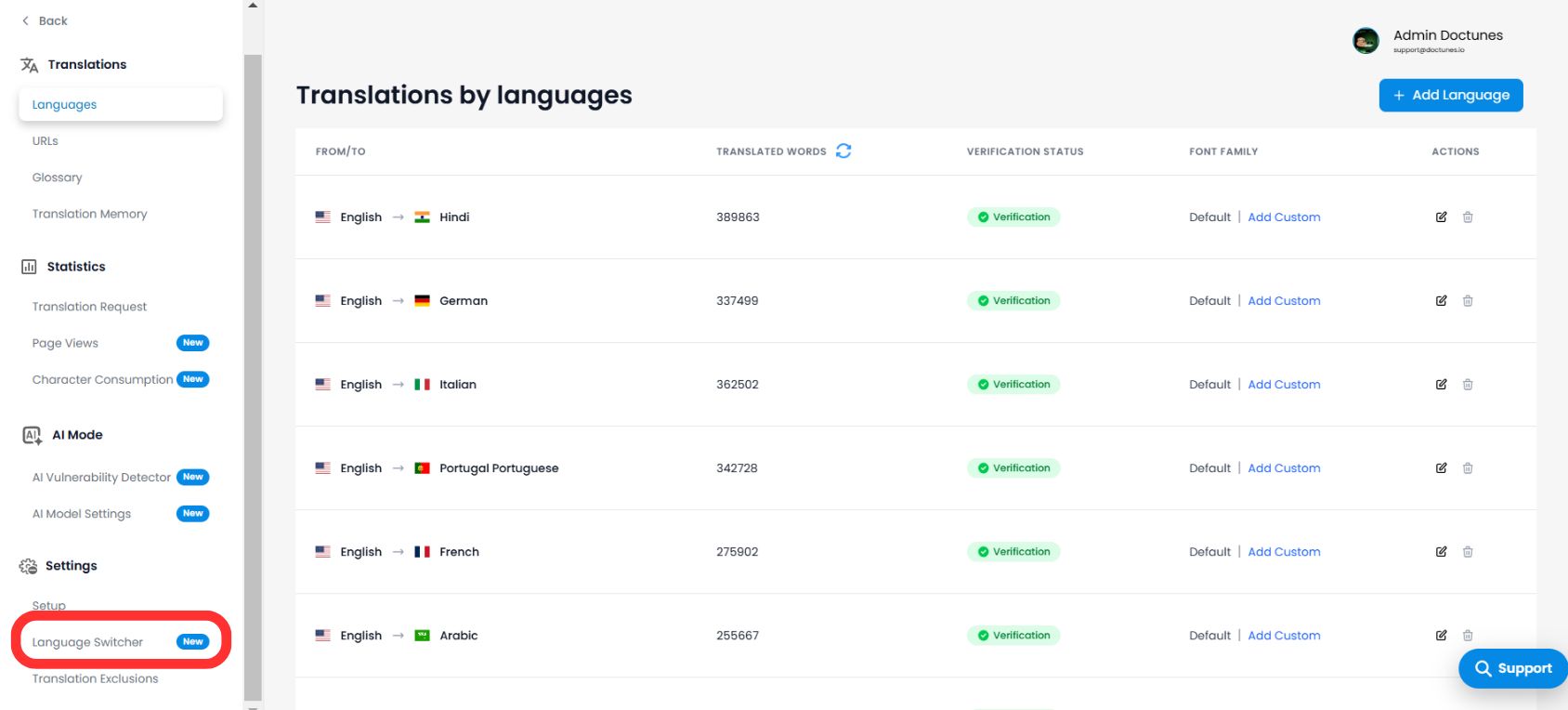
1. Aceder ao Editor de Interface
Para começar a personalizar a sua integração frontend:
- 1Navegue até ao seu Painel MultiLipi.
- 2Abrir Definições no menu lateral.
- 3Selecionar Seletor de Idioma.
💡 Dica Pro: Entrará no Editor de Seletores, que apresenta uma tela de pré-visualização em tempo real. Utilize o alternador na parte superior para alternar entre Desktop e Mobile vistas para garantir a responsividade em todos os dispositivos.
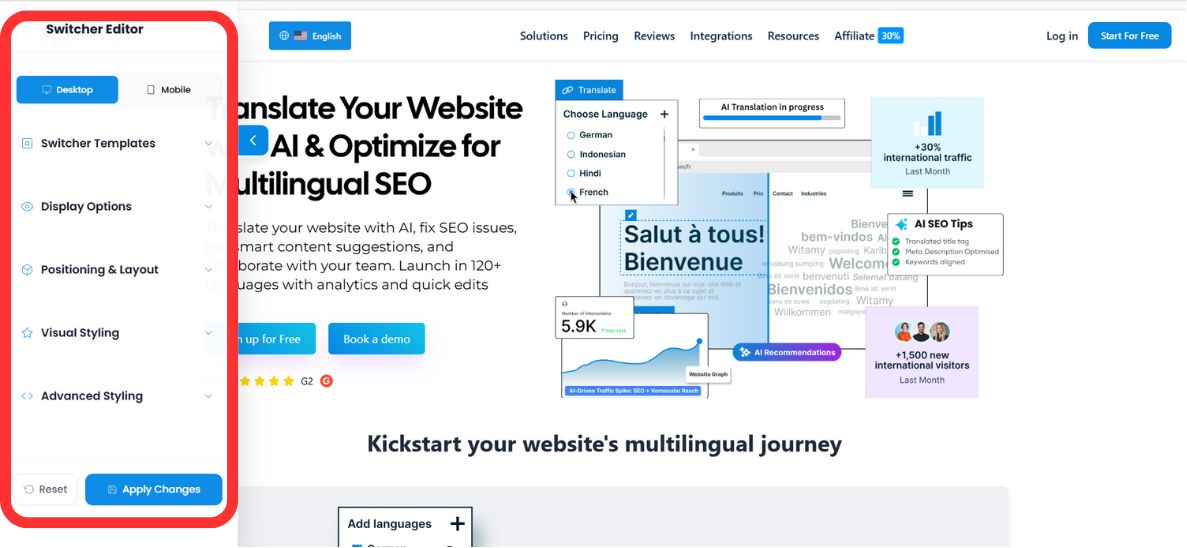
2. Passo 1: Selecionar a Arquitetura (Posicionamento)
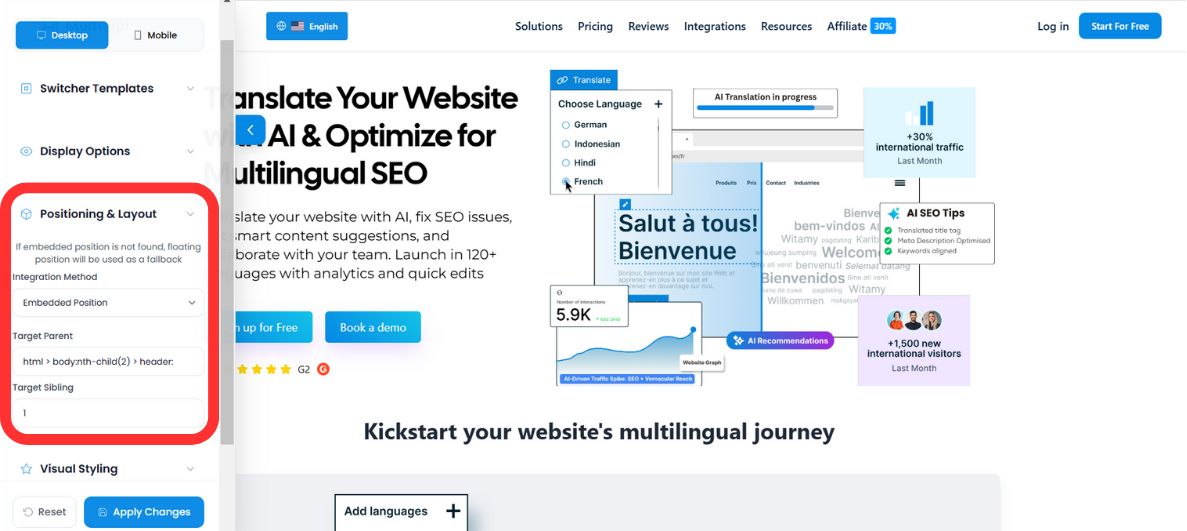
Defina como o seletor se comporta dentro do seu DOM. Tem dois modos de implementação:
Modo A: Flutuante (Padrão)
Comportamento: O seletor paira sobre o seu conteúdo, ancorado a um canto específico do ecrã (por exemplo, Canto Inferior Direito).
Caso de Uso: Ideal para visibilidade imediata sem alterar o código de layout existente do seu website.
Modo B: Embutido (Integrado)
Comportamento: O seletor é inserido num elemento HTML específico que definir (por exemplo, dentro da Barra de Navegação ou Rodapé).
⚠️ O Protocolo de Fallback
Se o seu contentor HTML especificado não for encontrado numa página específica, o MultiLipi Lógica de Fallback reverte automaticamente o seletor para o "Modo Flutuante". Isto garante que os utilizadores nunca fiquem bloqueados na seleção de idioma, mesmo que o layout mude.
3. Passo 2: Identidade Visual (Modelos e Cores)
Alinhe o seletor com o Sistema de Design da sua marca.
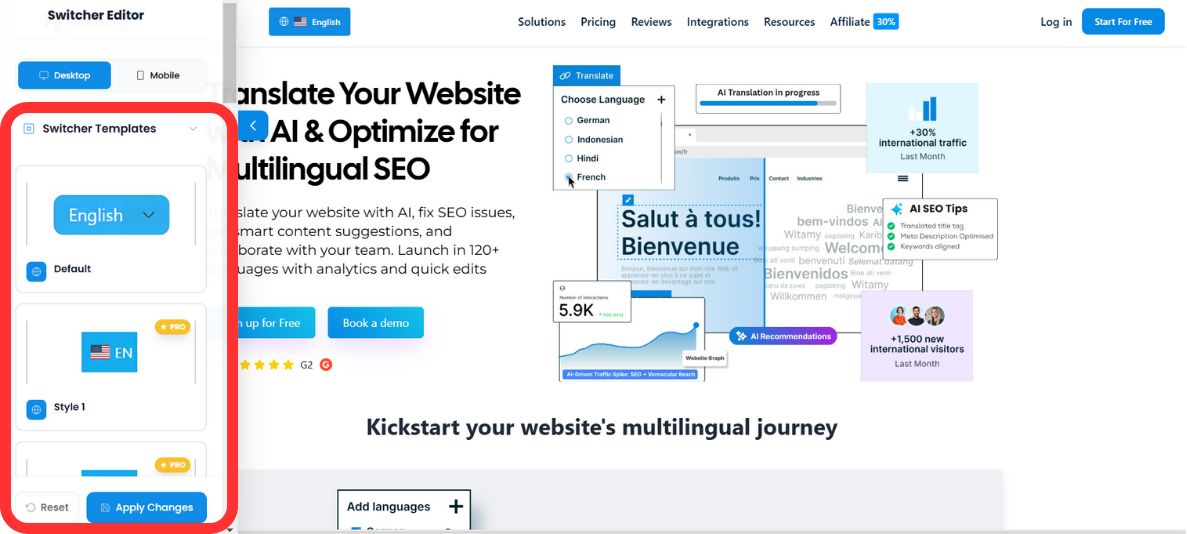
Seleção de Modelo
Escolha da nossa biblioteca de padrões de UI pré-configurados para corresponder à estética do seu site:
Integração de Paleta
Substitua os estilos predefinidos para corresponder às diretrizes da sua marca utilizando o Seletor de Cores incorporado ou valores RGB brutos:
- •Cor de Fundo: Combine os estilos da sua barra de navegação ou botões.
- •Cor do Texto: Garanta alto contraste para acessibilidade (conformidade WCAG).
- •Cor de Fundo ao Passar o Cursor: Define a cor de destaque quando um utilizador passa o cursor sobre uma opção de idioma no menu pendente — proporcionando um feedback tátil imediato.
✨ Configurar Efeitos Interativos ao Passar o Cursor
Dê ao seu seletor de idioma um aspeto premium e nativo, adicionando estados interativos ao passar o cursor.
- 1No separador Estilo Visual , localize o campo recém-adicionado Cor de Fundo ao Passar o Cursor campo.
- 2Clique para abrir o seletor de cores ou insira manualmente um valor exato RGB/RGBA para corresponder às diretrizes da sua marca.
- 3Esta cor será apresentada dinamicamente sempre que um utilizador passar o cursor sobre uma opção de idioma no menu pendente, proporcionando um feedback tátil imediato.
Opções de Visualização: Ordem de Alternância de Idiomas
Já não tem de se contentar com uma lista alfabética. Agora, pode dar prioridade a idiomas específicos no seu menu pendente com base nos seus principais mercados-alvo.
Definir a Ordem de Alternância de Idiomas
- 1Desloque-se para baixo até à secção Ordem de Alternância de Idiomas secção na barra lateral esquerda do Editor do Alternador.
- 2Verá uma lista em bloco de todos os seus idiomas-alvo ativos (por exemplo,
EN,AR,FI,FR). - 3Clique no Para cima (↑) e Para baixo (↓) setas junto a cada bloco de idioma para reorganizar a sua prioridade de apresentação.
- 4O idioma colocado no topo desta lista aparecerá em primeiro lugar quando um utilizador abrir o menu pendente.
💡 Dica Pro: Fixe o seu idioma com maior tráfego na posição superior. Por exemplo, se a maioria dos seus visitantes internacionais vier da Alemanha, colocar DE em primeiro lugar reduz os cliques necessários para alternar — melhorando a experiência do utilizador e reduzindo a taxa de rejeição nas suas páginas traduzidas.
4. Passo 3: Estilização Avançada (CSS Personalizado)
Para programadores que necessitam de controlo pixel a pixel, pode injetar regras CSS personalizadas diretamente no shadow DOM do widget.
Seletores CSS Comuns:
#dynamicDropdown- Alveja o contêiner principal da lista suspensa.#lang-switcher-selected-lang .fi- Alveja o ícone da bandeira do idioma atualmente selecionado.
Exemplo de Configuração:
/* Remove border radius for a sharp, square design */
#lang-switcher-selected-lang .fi {
  border-radius: 0px;
}

/* Customize the dropdown background */
#dynamicDropdown {
  background-color: #ffffff;
  box-shadow: 0 4px 12px rgba(0,0,0,0.1);
}
💎 Nota do Desenvolvedor: CSS personalizado permite-lhe substituir qualquer propriedade visual, mantendo a lógica funcional do seletor. Isto é particularmente útil para corresponder a sistemas de design complexos ou implementar variações de modo escuro.
5. Implementação e Verificação
Assim que a sua configuração estiver completa:
Pré-visualizar
Alterne entre os modos Desktop e Mobile no editor para verificar a consistência visual.
Guardar
Clique Guardar para enviar as alterações para o seu site de produção em tempo real instantaneamente.
Repor
Se precisar de recomeçar, utilize o Repor função para reverter para os estilos padrão do MultiLipi.
✅ Sucesso: O seu seletor de idioma já está ativo! As alterações propagam-se instantaneamente em todas as páginas onde o MultiLipi está implementado. Não é necessária a limpeza de cache nem a atualização da página para a maioria das configurações.