
Numa infraestrutura global, o atrito é o inimigo da conversão. Se um utilizador de Paris visitar o seu site, não deve ter de procurar manualmente um ícone de bandeira para mudar para francês. O Rediretor de Línguas para Visitantes atua como um controlador de tráfego inteligente. Inspeciona o pedido de entrada Accept-Language cabeçalho (localidade do navegador) e encaminha instantaneamente o utilizador para a versão localizada correspondente do seu site (por exemplo, fr.yoursite.com).
Este guia detalha o Protocolo de configuração para ativar esta camada de roteamento automatizada.
1. A Lógica de Roteamento
Como funciona a deteção.
Deteção:
Um utilizador acede a oteusite.com.
Inspeção:
O motor lê as definições do navegador (por exemplo, fr-FR).
Roteamento:
Se o francês for um idioma ativo no seu projeto, o sistema executa imediatamente um Redirecionamento Temporário 302 para o subdomínio francês.
Fallback:
Se o idioma do utilizador não for suportado, este permanece no idioma predefinido (Origem).
2. Protocolo de Configuração
Ative esta funcionalidade diretamente a partir do centro de comando do seu projeto.
Passo 1: Aceder ao Painel do Projeto
- •Inicie sessão no seu painel MultiLipi.
- •Navegue para a barra lateral esquerda e clique em Projetos para ver o seu portfólio ativo.
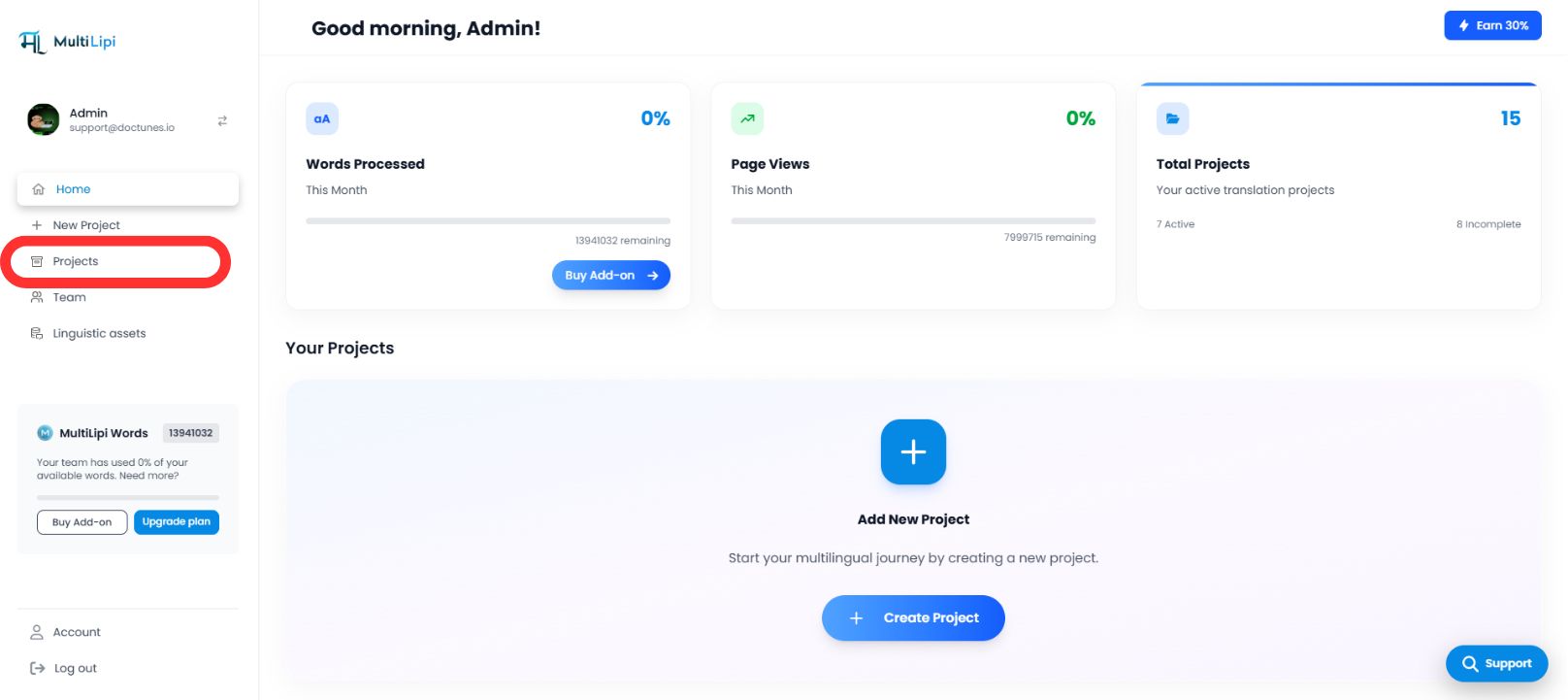
Passo 2: Selecionar Projeto de Destino
- •Localize o domínio específico que pretende configurar.
- •Clique no botão Mosaico do projeto para entrar na sua consola de gestão específica.
Passo 3: Aceder à Configuração de Configuração
- •Na barra lateral esquerda da vista do projeto, clique em Configurações.
- •A partir do menu suspenso ou sub-menu, selecione Definições do Projeto.

Passo 4: Ativar Roteamento
- •Percorra o painel de configuração até encontrar a "Redirecionador de Idioma do Visitante" opção.
- •Ação: Toggle the switch to
EM. - •Resposta do Sistema: O motor de roteamento está agora ativo. Novos visitantes serão automaticamente redirecionados com base na sua preferência de navegador.
Configuração Concluída – Motor de Roteamento Ativo
3. Benefícios Estratégicos
Porquê automatizar este processo?
Redução da Taxa de Rejeição:
Os utilizadores são menos propenso a sair imediatamente se virem conteúdo na sua língua nativa no primeiro segundo.
Velocidade de Conversão:
Remover o "troca manual" passo acelera a jornada do utilizador desde a página de destino até ao checkout.
Fallback Inteligente:
O sistema é não intrusivo; só redireciona se existir uma tradução correspondente, garantindo que nenhum utilizador fique bloqueado.
O Resumo:
A redireção automática de idioma transforma o seu site de um portal de tradução passivo num motor de localização inteligente que antecipa as necessidades do utilizador antes mesmo de clicar.