
Traduzir o texto nas suas páginas web é apenas metade da batalha na localização de um website. Se os seus banners de marketing, infográficos, gráficos ou imagens de produtos contiverem texto na sua língua original, os visitantes internacionais terão uma experiência de navegação chocante e desconexa — mesmo que cada palavra na página em si esteja perfeitamente traduzida.
A Ferramenta de Tradução de Imagens IA da MultiLipi resolve este problema instantaneamente. Em vez de passar horas a redesenhar manualmente gráficos localizados em ferramentas como Figma ou Photoshop, MultiLipi deteta texto dentro das imagens do seu site, traduzindo-o utilizando IA ciente do contexto, e substitui a imagem de forma integrada — tudo isto mantendo a sua marca intacta.
O Problema: Conteúdo Visual Deixado Por Traduzir
Até 60% do conteúdo do website reside em imagens — cabeçalhos promocionais, selos de produtos, gráficos de comparação de funcionalidades, fotos de equipa com sobreposições de texto e banners de chamada para ação. Ferramentas de tradução tradicionais perdem tudo isto. A Tradução de Imagens por IA da MultiLipi é a ponte que fecha esta lacuna, proporcionando aos visitantes internacionais uma experiência verdadeiramente nativa. Saiba mais sobre como SEO Multilingue depende de todos os elementos da sua página estarem localizados.
Principais Benefícios da Tradução de Imagens por IA
Vantagens operacionais que mudam a forma como localiza.
Enormes Poupanças de Tempo de Design
Não há necessidade de recriar camadas complexas de design gráfico para cada implementação de idioma. O que antes levava um designer 2–3 horas por idioma, agora leva segundos.
Uniformidade Linguística Completa
Ao aplicar as regras do seu Glossário de Projeto pré-existente, o texto incorporado nos seus recursos visuais corresponde perfeitamente ao texto do seu website — sem inconsistências.
Taxas de Rejeição Mais Baixas e Conversões Mais Elevadas
Os visitantes internacionais recebem uma jornada profundamente coesa e com sensação nativa que gera confiança. Uma experiência visual localizada remove a última barreira de atrito antes de uma conversão.
Passo a Passo: Traduza as Imagens do Seu Website
Um processo visual, sem código, gerido através das suas páginas ativas.
Traduzir uma imagem é um processo visual, sem código, gerido diretamente através das páginas ativas do seu website através da nossa interface interativa. Não precisa de descarregar quaisquer ficheiros, abrir software de design ou escrever uma única linha de código.
Abrir o seu separador de URLs
Inicie sessão no Painel MultiLipi e escolha o seu projeto de website. No painel de navegação esquerdo, em " Traduções categoria, clique em URLs". Este painel lista todas as páginas indexadas do seu website.
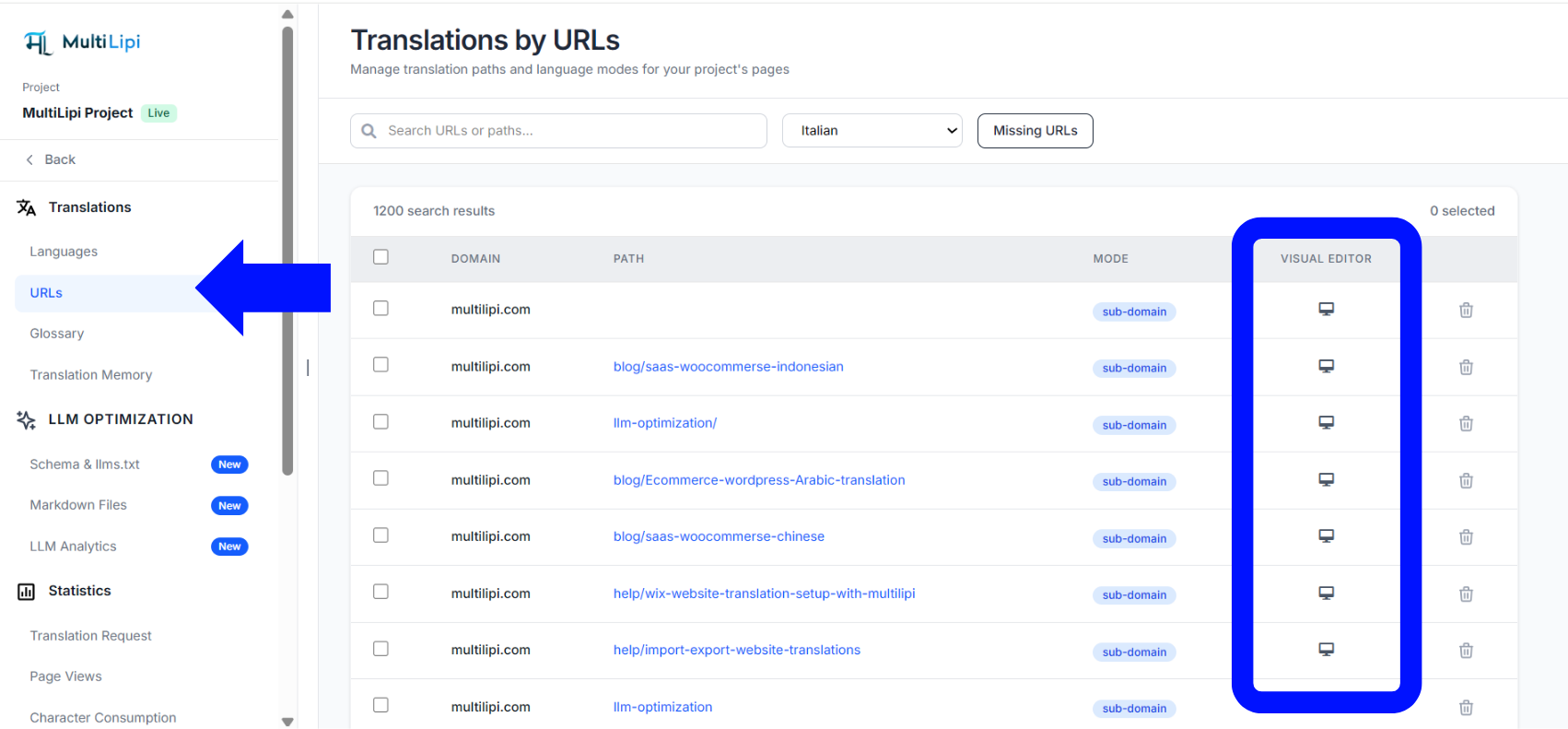
Iniciar o Editor Visual
Identifique a página que contém o gráfico que pretende modificar. Mova o cursor para o lado direito dessa linha, em " Editor Visual coluna e clique no Ícone de Monitor/Ecrã". Isto abre a página ativa do seu website numa sobreposição editável — não é necessária nenhuma extensão ou plugin de navegador.
Selecionar o Gráfico de Destino
Navegue pela sua página dentro do editor e clique diretamente na imagem que pretende modificar. Na sobreposição de opções que aparece acima do elemento, certifique-se de que está em Modo de Tradução por IA em vez de Modo de Caminho de URL.
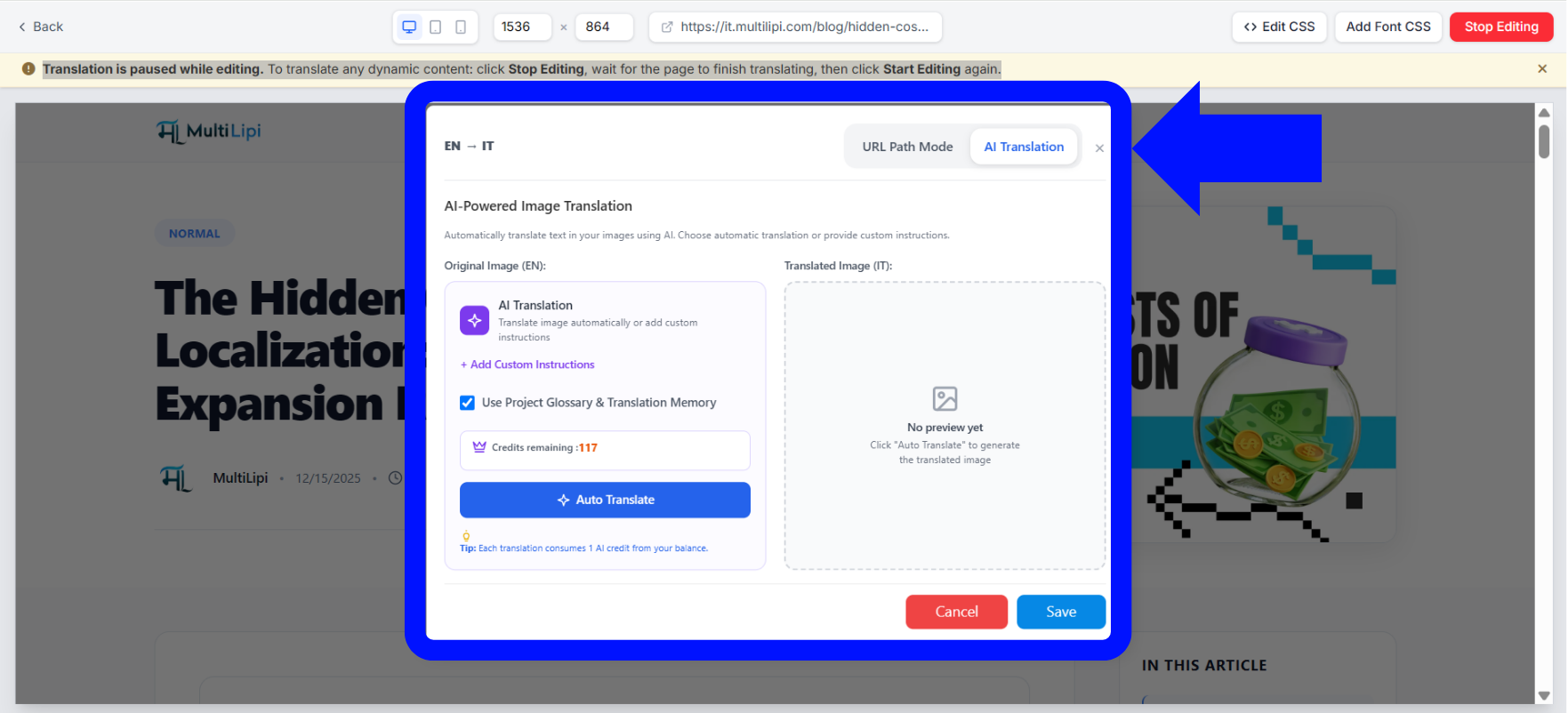
Configurar Opções de Contexto e Iniciar Tradução
Uma janela modal intitulada Tradução de Imagens Potenciada por IA será apresentado com opções de configuração:
Adicionar Instruções Personalizadas: Clique neste link para transmitir contexto específico ou diretrizes estilísticas ao motor de geração.
Utilizar Glossário do Projeto e Memória de Tradução: Certifique-se de que esta caixa está selecionada para forçar a imagem a respeitar os termos de vocabulário pré-guardados do seu projeto — garantindo a consistãncia da marca.
Verificar Saldo: Verifique a sua alocação total ao lado do bloco de estado de Créditos restantes antes de prosseguir.
Clique no botão azul proeminente Tradução Automática para iniciar o processamento.
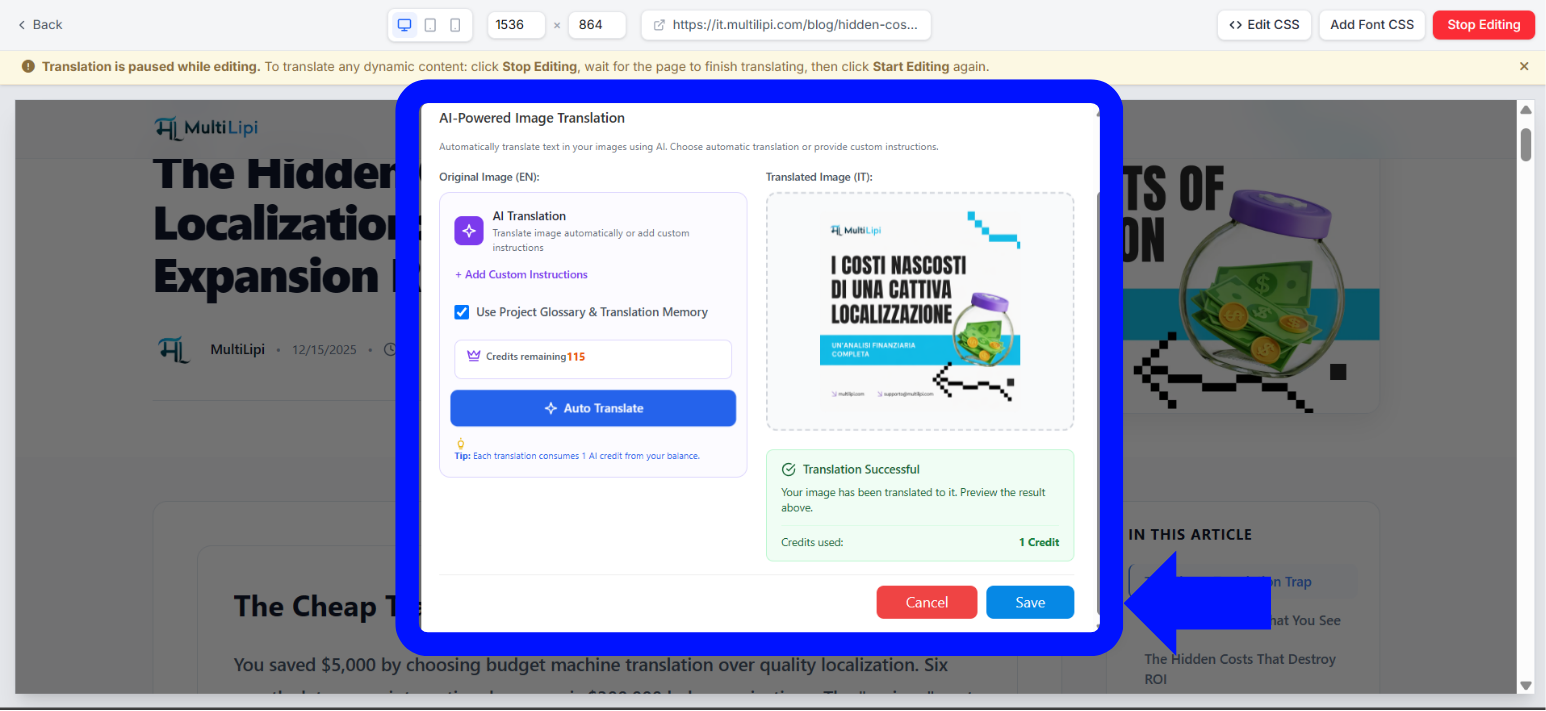
Rever e Guardar
Aguardar 1–2 minutos enquanto o canal de engenharia processa os ativos. Assim que o processamento terminar, aparecerá um painel de validação verde com a mensagem Tradução Bem-Sucedida aparecerá, exibindo uma pré-visualização sob o Imagem Traduzida coluna juntamente com um Créditos utilizados: 1 Crédito indicador atualizado.
Clique no azul Guardar botão no canto inferior da janela modal para publicar o ativo gráfico localizado no seu site. O seu pãblico internacional verá agora a imagem traduzida de imediato.
Como Funcionam os Créditos de Imagem e Complementos
Um modelo de transação direto que escala com as suas necessidades.
Visão Geral do Sistema de Créditos
Compreender como os créditos são consumidos e repostos.
Modelo de Consumo: Cada pedido individual bem-sucedido de tradução de imagem consome exatamente 1 crédito de IA do saldo agregado da sua conta.
Inclusões do Plano: A sua alocação de créditos padrão é regida pelo seu nível de subscrição ativo. Níveis de projeto de ponta recebem maiores alocações de créditos nativos no início de cada ciclo de faturação.
Compra de Créditos Extra: Se a sua equipa esgotar a sua alocação a meio de um ciclo de faturação, navegue até à página de definições do seu Perfil de Conta dentro do painel principal para comprar complementos de crédito de imagem personalizados instantaneamente.
Quer explorar qual plano inclui a melhor alocação de créditos para o tamanho da sua equipa? Visite a página de MultiLipi Preços para comparar os níveis e encontrar a solução certa para as suas necessidades de localização.
Dica Pro: Lidar com Atualizações Futuras de Gráficos
A Memória de Tradução mantém-no sincronizado automaticamente.
Um benefício importante da arquitetura do MultiLipi é como ele lida com futuras atualizações da sua biblioteca de multimédia. Se a sua equipa de design atualizar um gráfico original — por exemplo, alterando uma imagem de produto ou atualizando um preço promocional no seu principal ativo em inglês — o MultiLipi deteta a modificação automaticamente.
Os seus layouts de texto traduzidos anteriormente são guardados de forma segura na Memória de Traduçãoda sua conta, o que significa que não terá de retraduzir manualmente o ativo do zero. O sistema simplesmente sobreporá o seu texto localizado aprovado ao layout gráfico recém-carregado, garantindo que os seus subdomínios internacionais permaneçam perfeitamente sincronizados com o mínimo de esforço.
Ferramentas e Recursos Relacionados
A tradução de imagens por IA funciona melhor como parte de uma estratégia de localização completa. Aqui estão recursos adicionais para o ajudar a construir um site verdadeiramente global:
Comece a localizar os seus recursos visuais hoje mesmo
Remova a barreira final para um site perfeitamente localizado.
O conteúdo visual é frequentemente o que determina a primeira impressão que um utilizador tem da sua presença digital. Ao garantir que os seus gráficos, distintivos e cabeçalhos promocionais falam o idioma nativo do seu cliente, remove a barreira final para uma experiência de marca genuinamente global.
Volte ao seu espaço de trabalho, abra o painel de URLs, e traga os seus recursos visuais para a era multilíngue hoje. Se é novo no MultiLipi, explore as nossas soluções de localização para comércio eletrónico ou verifique o Página de Perguntas Frequentes para perguntas comuns de configuração.
Precisa de ajuda? Se encontrar problemas de formatação em gráficos altamente complexos ou precisar de adquirir alocações de créditos de nível empresarial para o seu espaço de trabalho, contactar o Suporte MultiLipi para configurar as definições da sua plataforma. A nossa equipa de engenharia está pronta para ajudar.